

Share


Boost Your Stream Instantly: Complete Guide to Alive Studio’s Effects
Visual effects play a major role in shaping the overall impression of a live stream.
Adding simple visual cues like applause, confetti, or sparkles can instantly boost the energy of a stream and create a stronger sense of connection with viewers.
That said, many streamers give up on using effects because they feel “too complicated to manage” or worry they won’t have time to operate them during a live broadcast.
That’s where the effect features in Alive Studio really stand out.
With Alive Studio, you can trigger effects with a single click during your stream—or even have them activate automatically in response to viewer comments or Super Chats.
What’s more, many of these features are available on the free plan, making them easy to adopt even for beginners.

How Do Effects Enhance a Live Stream?
Effects aren’t just flashy decorations. When used well, they significantly elevate the overall viewing experience.
- Key hype moments are instantly recognizable
→ Viewers can visually tell when something exciting is happening - A stronger sense of “live” interaction
→ Real-time reactions become visible, enhancing the live feel - A more polished, professional look
→ Motion and effects make the entire stream feel more refined - Easier for new viewers to jump in
→ The flow of interaction and engagement is easy to follow - Clear moments of closure and achievement
→ Successes, clears, and milestones leave a lasting impression
In particular, for chat-focused or variety streams, simply adding on-screen reactions tends to increase viewer retention and comment activity.
Common Ways Effects Are Used in Streams
Effects aren’t limited to special events or major announcements.
Even in everyday streams, adding effects at moments where you want a reaction—or where excitement naturally peaks—can be surprisingly effective.
Below are some common examples of how effects are used across different types of streams.
- Chat streams: Light effects like sparkles or “LOL” overlays when jokes land
- Game streams: Confetti or celebratory effects after clearing a stage or winning
- Milestone streams: Applause or hearts for anniversaries or subscriber goals
- Merch or announcement segments: Celebration effects when purchases or reactions come in
Even small, subtle reactions—rather than big, flashy effects—can significantly reduce the distance between you and your audience.
Once effects are in play, viewers naturally feel more involved, which leads to more spontaneous reactions and comments.

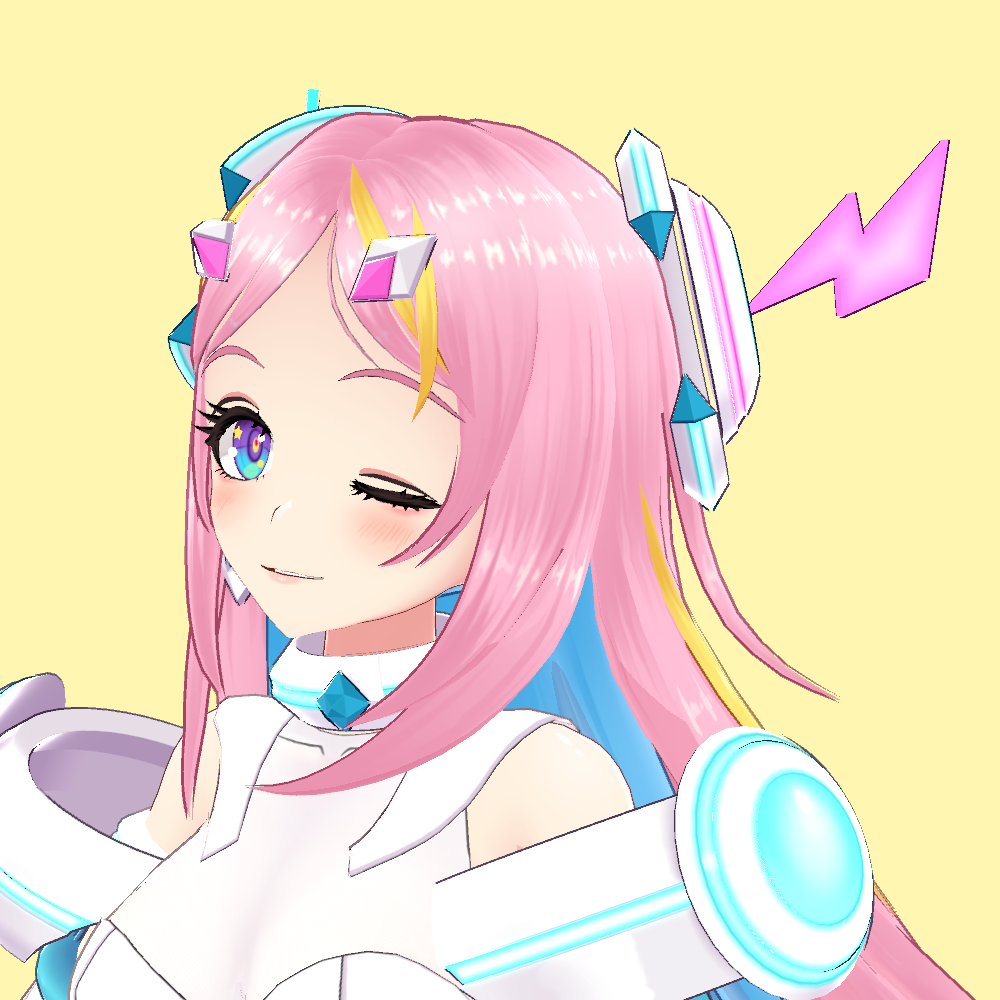
What You Can Do with Alive Studio’s Effects
Alive Studio’s effect features can be roughly divided into four categories.
① One-click “instant effects”
② Button-based control via Stream Deck
③ Automatically triggered effects based on viewer actions (Premium)
④ Custom effect creation to match your stream’s theme (Premium)
Let’s take a closer look at what each of these can do and how they’re used.
① One-Click “Instant Effects”
This feature lets you trigger effects directly from OBS at any moment you choose.
Moments like “That line landed perfectly!” or “This part needs emphasis!” are exactly where instant effects shine.
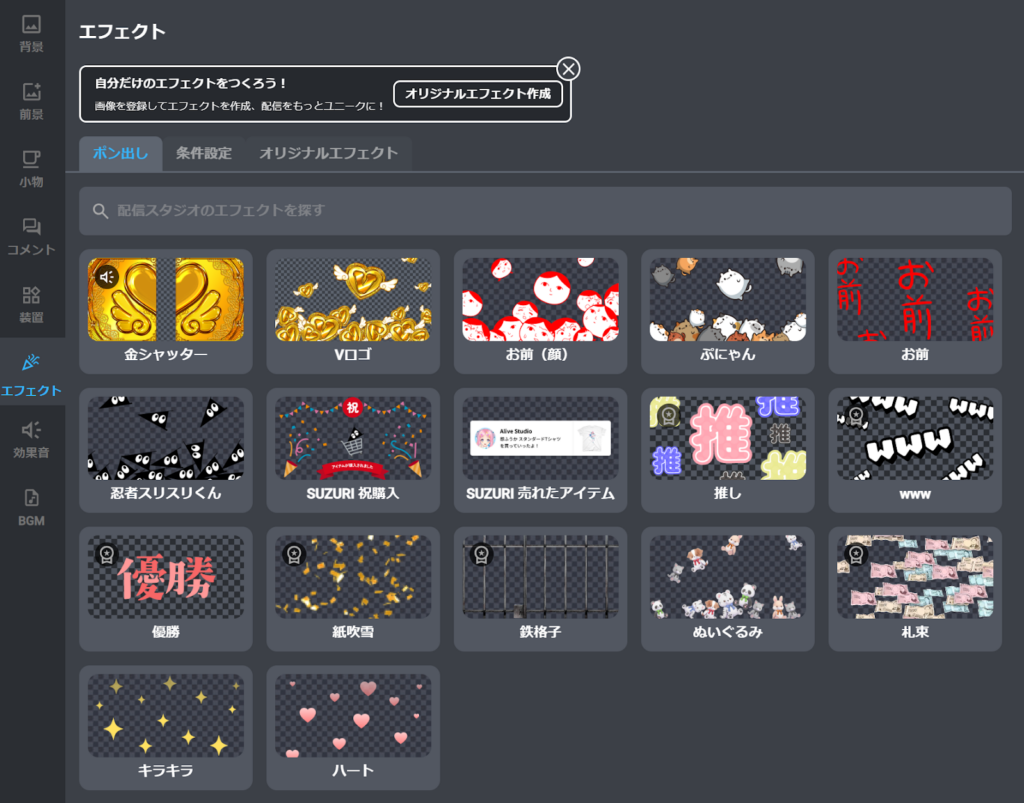
Popular instant effect examples
- Sparkles / Hearts
- Plush toys
- “Best!”, “LOL”, “Victory” (Premium)
- Confetti / Flying cash (Premium)
- Ninja Surisuri-kun, SUZURI purchase celebrations, sold-item notifications, and more
Official Collaboration Effects Also Available
In addition to standard visual assets, Alive Studio also offers official effects created in collaboration with major companies.
For example:
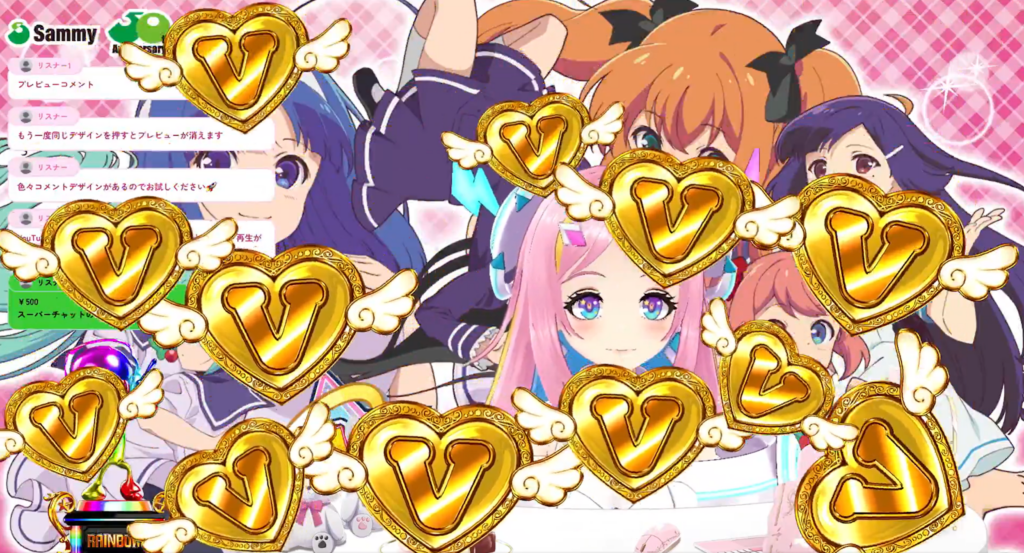
- Effects inspired by Sammy Corporation’s iconic visuals, such as raining “V logos” or dramatic gold shutter animations (with sound), perfect for high-energy moments.
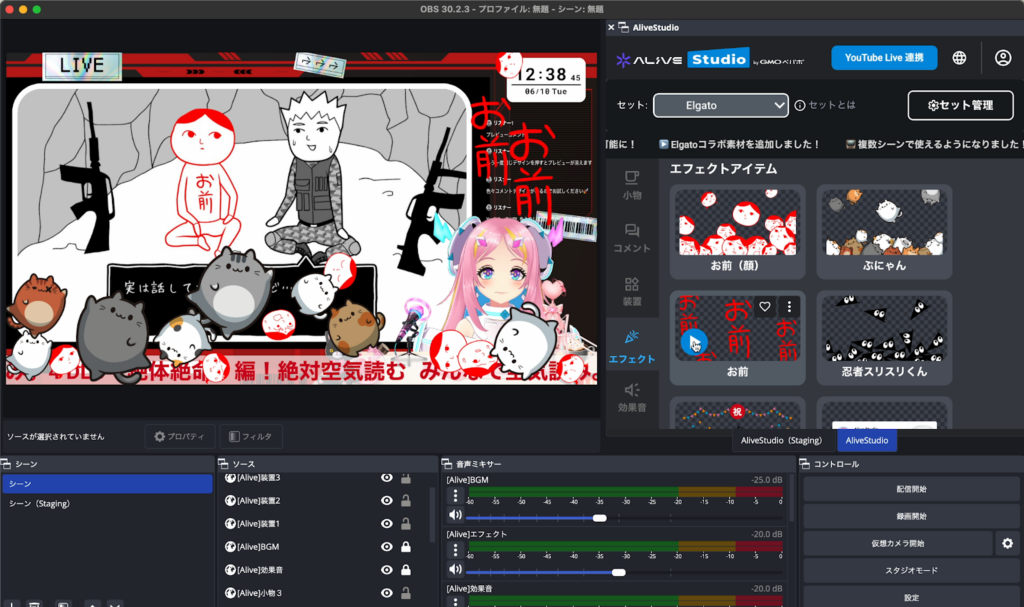
- Using effect assets from G-Mode Corporation’s games “Minna de Kuuki Yomi.” and “Punyan”, you can add a sense of playfulness and friendliness to talk streams and game streams.
Using officially branded designs and world-building elements adds credibility, richness, and an event-like feel to your stream.
Especially when streaming official titles, these polished effects alone can significantly elevate the overall impression of your broadcast.
Recommended Moments to Use Them
Instant effects are most impactful when used sparingly at just the right moments.
- Reacting to yourself
When you stumble over words or laugh at your own mistake - Segment transitions
At the start, ending, or when moving to the next section - Immediate responses to viewer actions
First-time comments, subscriptions, follows, merch purchases, or Super Chats



Instant effects are incredibly straightforward to use. Just open “Effects” in Alive Studio and click the one you want to trigger. As the name suggests, every click instantly launches the effect.
② Button Control with Stream Deck
You can also control instant effects through Stream Deck integration.
With Stream Deck, you can trigger not only effects, but also switch backgrounds and foregrounds, toggle props or comment frames, and play sound effects or BGM—all with a single button press.
This is especially useful for game streams or singing streams where mouse control isn’t practical.
How to Use with Stream Deck
With Stream Deck Mobile, you can also control it from your smartphone, allowing flexible operation that fits your streaming style.
Please refer to the article below for details on how to link Stream Deck with Alive Studio.
How to Set Up Alive Studio on Stream Deck
Once you’ve set effects on Stream Deck, you can trigger them during your stream just by pressing a button.
If you’d like to learn more about Stream Deck itself, be sure to check out the hardware review below.
[Recommended for Beginners] Stream Deck / Stream Deck + Hands-on Review & Usage Guide
③ “Condition-Based Effects” That Trigger Automatically by Viewer Actions (Premium)
With Alive Studio’s Premium plan, you can automatically display effects triggered by viewer actions.
Available Conditions
- YouTube / Twitch comments
When a listener’s comment contains specified keywords, the effect is triggered. - Super Chat (YouTube only)
An effect is triggered when a Super Chat is sent.
You can set conditions such as “¥○○ or more.” - When a SUZURI item is sold
This allows effects to trigger automatically during the stream, without manual operation each time.
How to Set Up Condition-Based Effects
To set conditions based on YouTube/Twitch comments or Super Chats (YouTube only), you first need to connect your stream.
How to Connect Your Stream
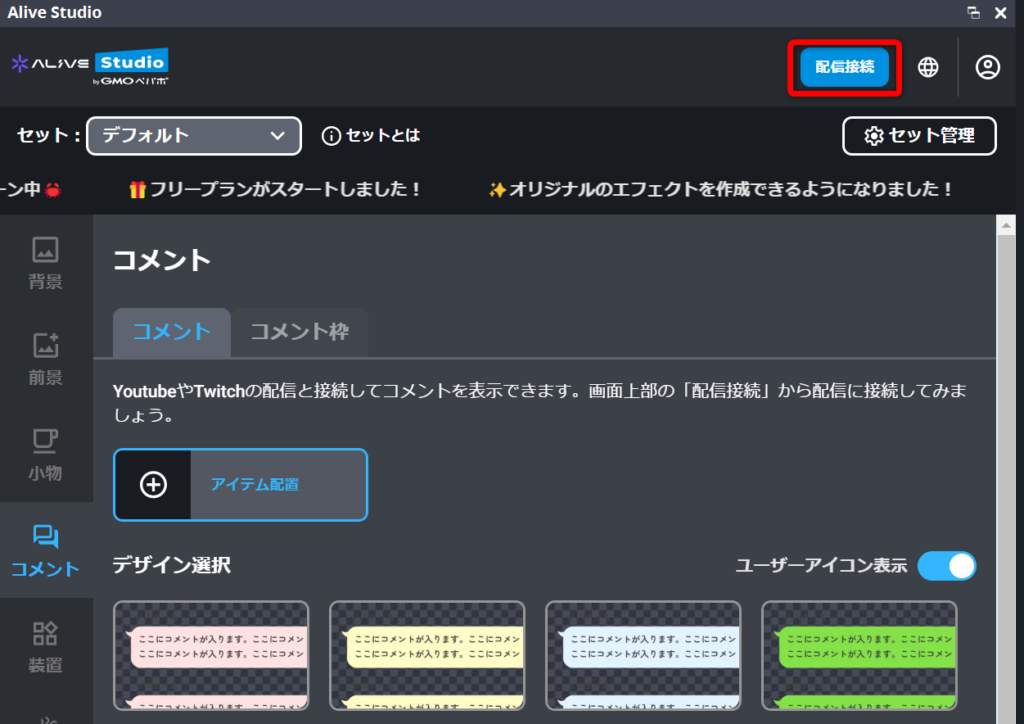
1. Click “Stream Connection” at the top of Alive Studio.
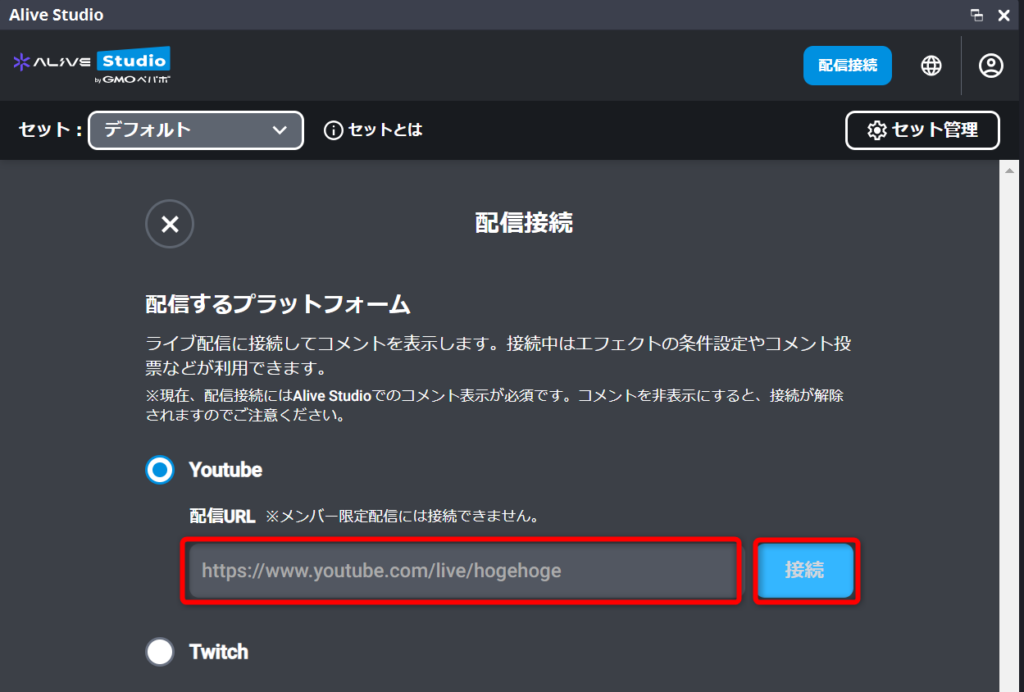
2. Connect depending on the platform.
- For YouTube
Copy and paste the stream URL, then click “Connect.”
- For Twitch
Click “Connect.”
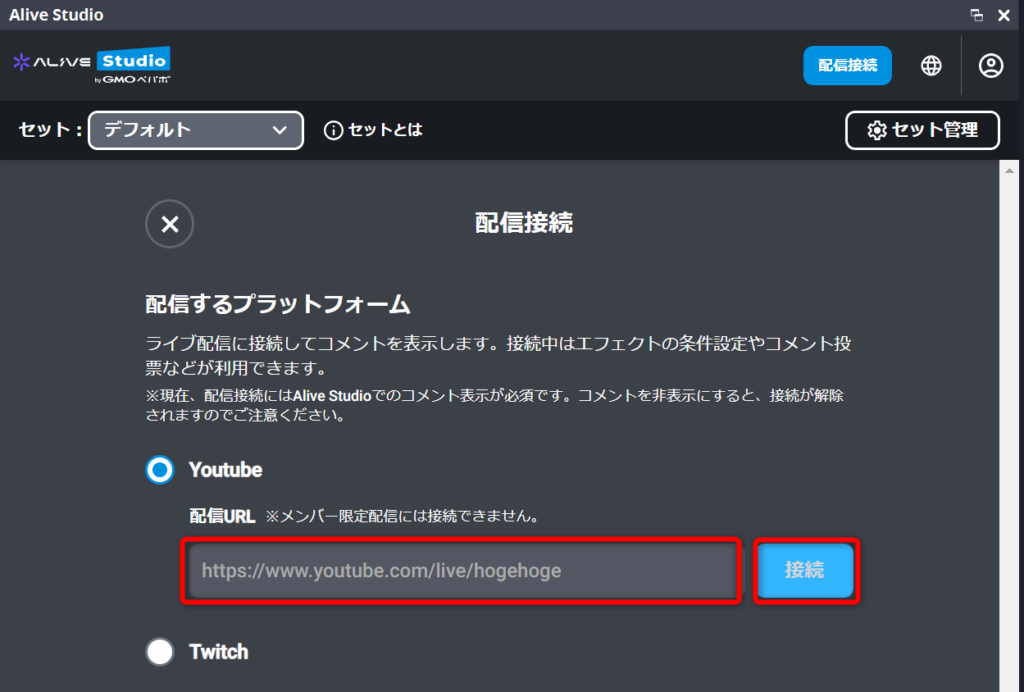
*If this is your first time connecting Twitch, or if your Twitch account is not yet registered with Alive Studio, you will be prompted to log in to Twitch. Please follow the on-screen instructions.
Once connected, you can also easily display comments on your stream screen. For details, please see the article below.
YouTube & Twitch Integration! Easily Display Stream Comments with Alive Studio Stream Connection
To set conditions for effects triggered by SUZURI item sales, please configure SUZURI integration as described below.
How to Set Up SUZURI Integration
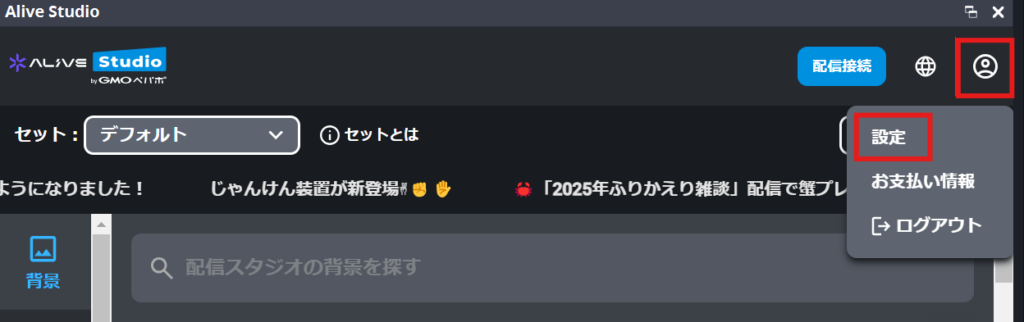
1. Click “Settings” from the user icon in the top-right corner of Alive Studio.
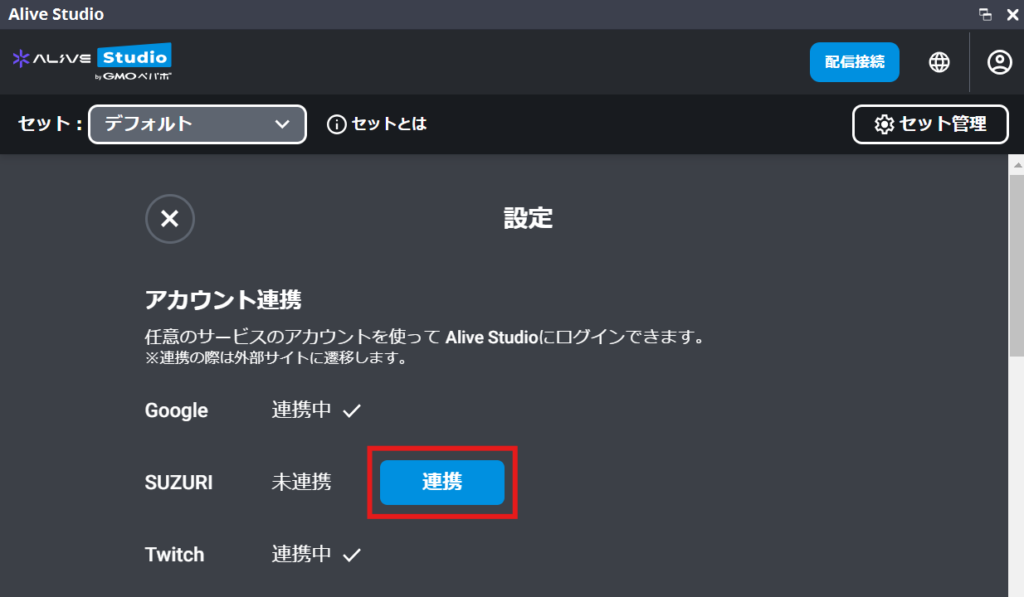
2. Click “Connect” under SUZURI.
3. Authenticate with an existing SUZURI account or create a new one.
How to Set Effect Conditions
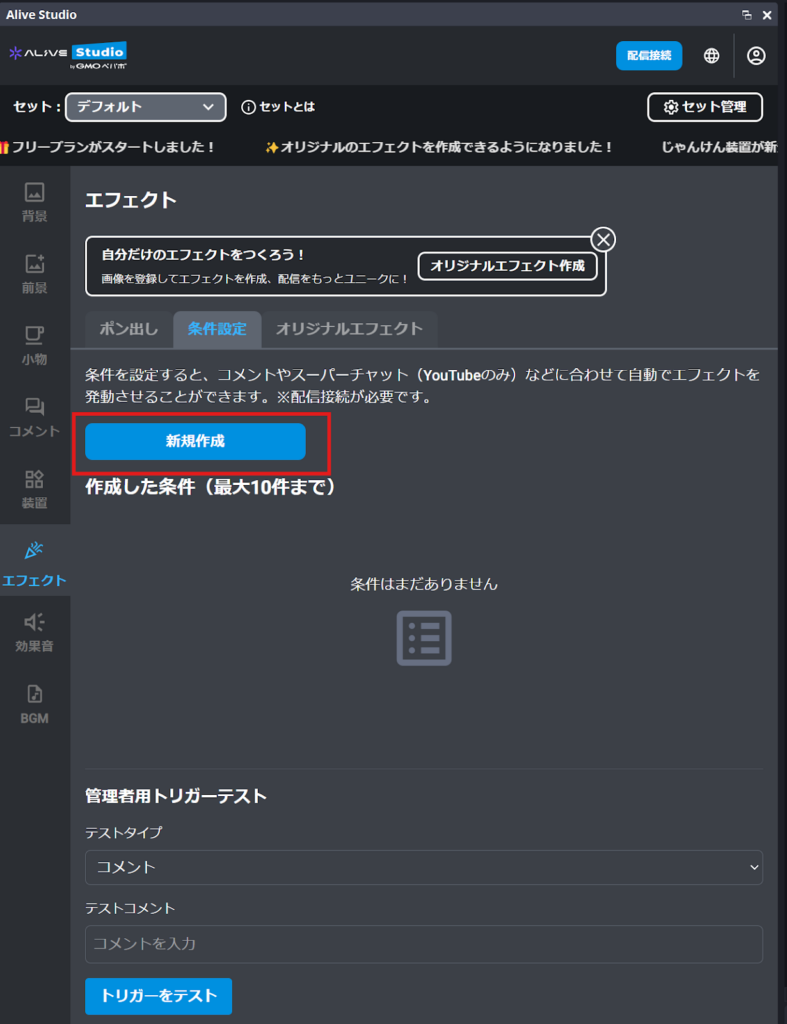
1. Go to “Effects” > “Condition Settings” and click “Create New.”
2. Enter a title, select and configure the condition, choose the effect to trigger, then click “Save.”
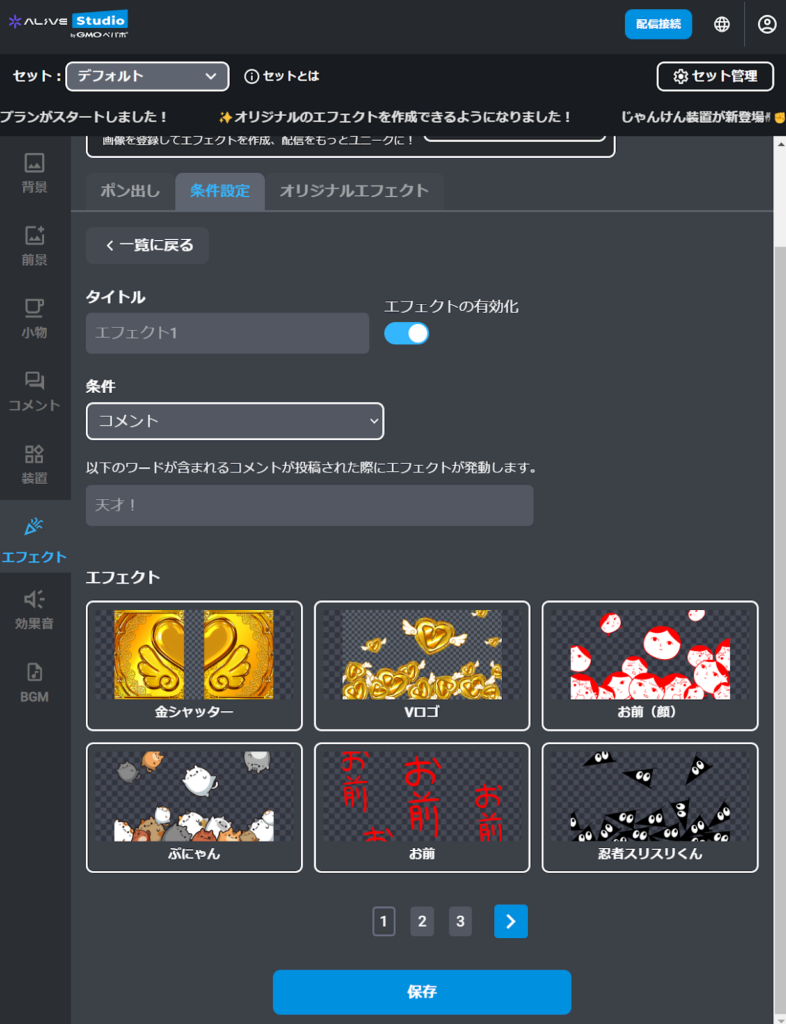
The effect will now trigger automatically based on the saved conditions.
Recommended Condition-Based Effect Combinations
The biggest appeal of condition-based effects is that viewer comments become “triggers” for on-screen effects.
This creates a more interactive experience, greatly enhancing the sense of unity and live excitement.
| Condition | Effect Example | Effect |
|---|---|---|
| Hype words (“lol”, “www”) | www | The screen reacts at the moment laughter occurs, visually conveying that the stream is lively. |
| Cheering words (“You got this!”, “Go!”) | Sparkles / Oshi / Hearts | Great for game or endurance streams. Supportive comments turning into effects give viewers a sense of participation. |
| Celebration words (“Congrats!”, “Congrats!”) | V Logo / Confetti | Perfect for milestones like subscriber goals, strongly highlighting the “special moment.” |
| Super Chat | Gold shutter / V Logo / Confetti / Money | Large, eye-catching effects emphasize special support and boost overall excitement. |
| When a SUZURI item is sold | Ninja Surisuri-kun / SUZURI Purchase Celebration / Sold Item Display | Visualizing the moment of purchase lets viewers share the joy and can motivate further fan support. |
Letting viewers know in advance—via captions or verbally—that “this comment triggers an effect” makes it easier for newcomers to participate.
For more tips on using captions with Alive Studio, please check out the article below.
Easily Display Captions on Your Stream with Alive Studio! Free Tips & Techniques
④ “Original Effect Creation” to Build Your World (Premium)
One of Alive Studio’s strengths is the ability to create your own custom, original effects.
- Effects using your logo or illustrations
- Signature channel-specific effects
- Effects for anniversary or milestone streams
These allow you to express a style that perfectly matches your stream’s unique world and theme.
How to Create Original Effects
No advanced editing skills are required. As long as you have your assets ready, you can turn them into effects in just a few simple steps.
1. Click “Effects” > “Original Effects”
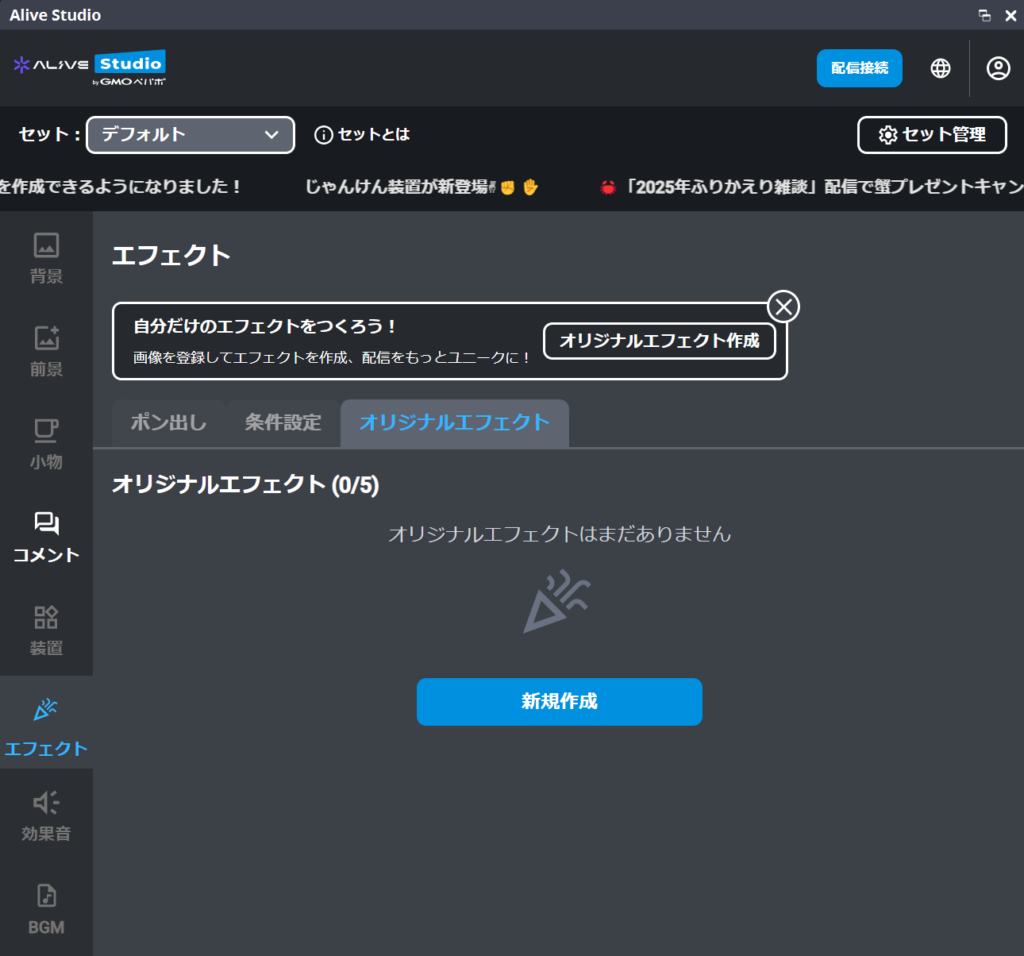
2. Click “Create New”
3. Select the image you want to use as an effect, choose an animation, and give it a clear, easy-to-understand title.
※Please note that images or logos that may infringe on third-party rights cannot be used.
4. Click “Save”
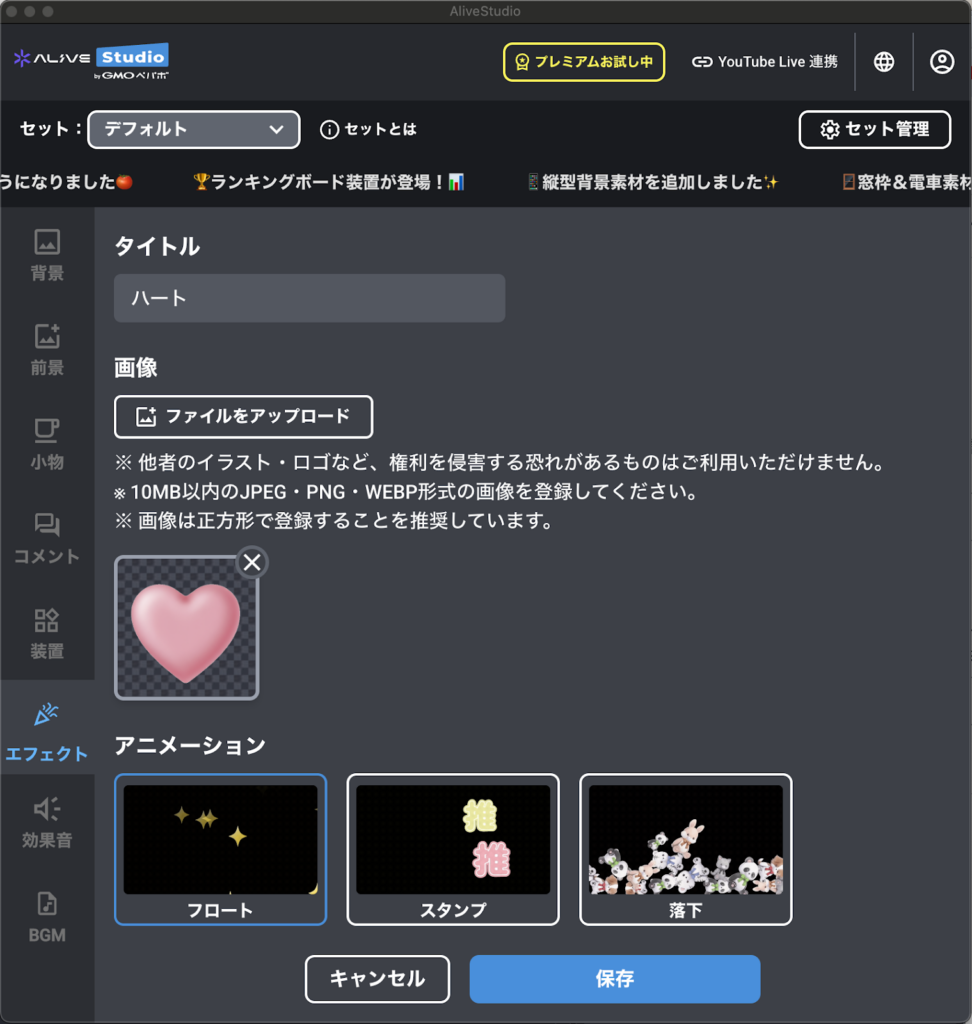
You can now use your original effects with instant triggers or conditional settings.
In Alive Studio, basic instant-trigger effects are available even on the free plan.
A recommended approach is to start for free, get comfortable with effects, and then gradually try conditional settings or original effects as needed.
Get Started Here | How to Sign Up for Alive Studio (Free)
If you haven’t registered for Alive Studio yet, here’s a quick overview. You can try out the effect features right away, even on the free plan.
After creating a free account, follow the steps below.
1. Download the dedicated script
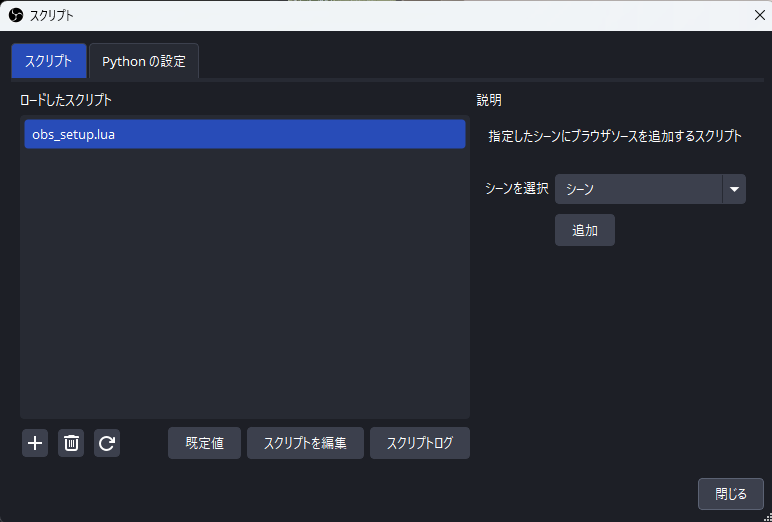
2. Register it in OBS
Open OBS and click “Tools” > “Scripts.”
Click the “+” button and select the downloaded script.
Choose the scene where you want to add “Alive Studio” and click “Add.”
3. Add a Custom Browser Dock
From the OBS menu, click “Docks” > “Custom Browser Dock.”
Enter the URL below and click “Apply.”
| Dock Name | URL |
|---|---|
| Alive Studio (any name) | https://studio.alive-project.com/ |
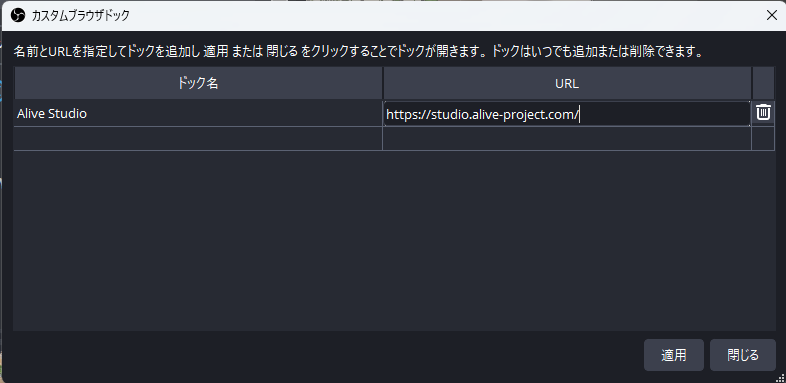
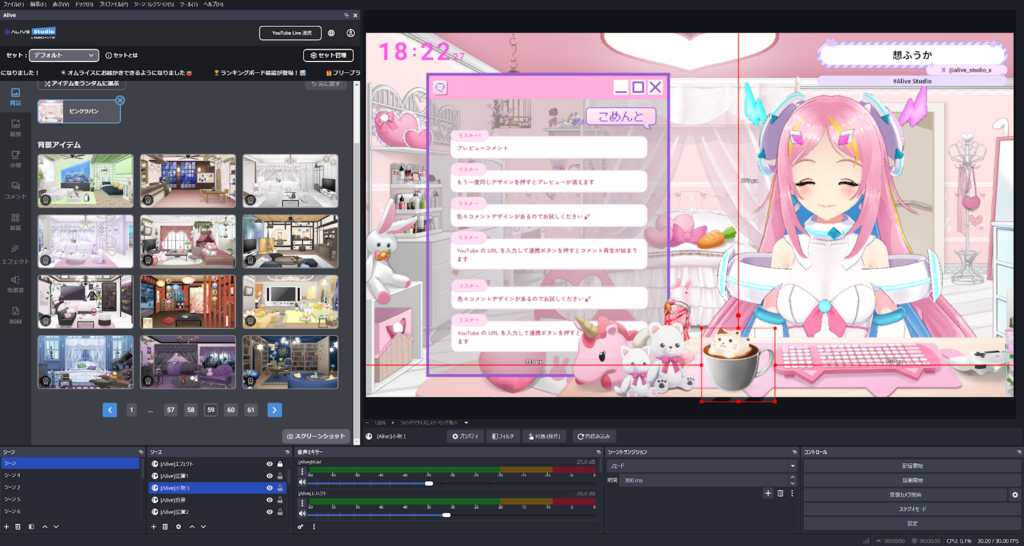
Once set up, the Alive Studio interface will appear directly inside OBS.
About the Free Plan and Premium Plan
Alive Studio offers two plans: a basic free plan, and a Premium plan that unlocks all features and assets.
With the free plan, you can use essential stream production features at no cost, including limited access to instant-trigger effects.
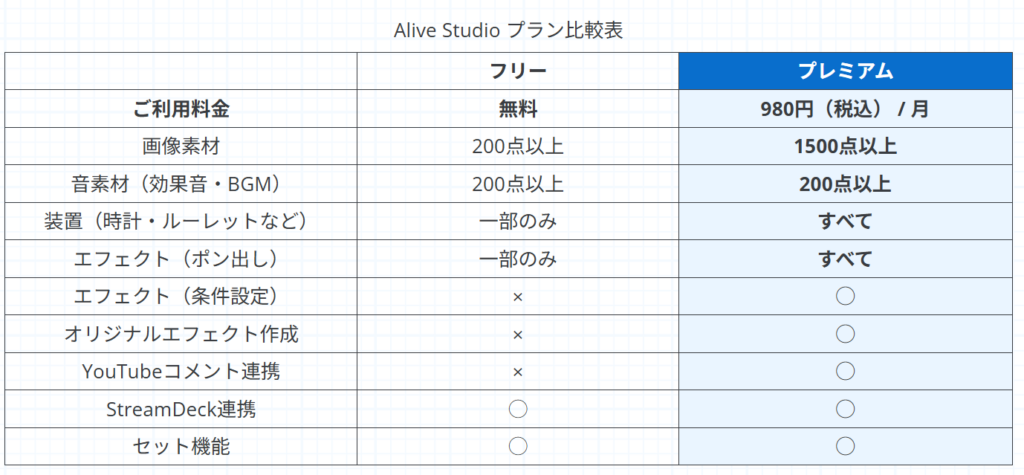
If you just want to refresh the mood of your stream or see whether effects fit your style, the free plan alone is more than enough to get started.
You can subscribe to the Premium plan using the steps below.
How to Subscribe to the Premium Plan
- Log in to Alive Studio (https://studio.alive-project.com/)
- Click the profile icon in the top-right corner
- Select “Billing Information”
- Click “Upgrade to Premium Plan”
- Enter your payment details and complete the payment
You can switch between the free and premium plans at any time, on a monthly basis.
For example, you might use Premium for special anniversary streams, and switch back to the free plan during quieter months.
Conclusion | Effects Are Tools for Creating Excitement
Effects aren’t just about making your stream look flashy.
They’re visual communication tools that help convey moments like “This is the highlight” or “Let’s enjoy this together.”
With Alive Studio’s effect features, you can:
- Create excitement with a single click
- Automatically react to viewer engagement
- Build a cohesive visual style that matches your channel or content
All of this is easy to achieve without overcomplicating your setup.
If effects have always felt intimidating or time-consuming, start with the free instant-trigger effects.
Even adding just one small visual touch can noticeably change the mood of your stream and how viewers respond.
Once you’re comfortable, try experimenting with conditional effects or creating your own to gradually shape a style that truly feels like your stream.
Alive Studio is a stream design service built to help creators focus on what matters most: talking and having fun.
Make effects your ally, and take your streaming experience to the next level.