


Share


Revitalize Your Streaming Content with Alive Studio’s Ranking Board
Index
“Recently, my streaming content has become monotonous,” “There are comments, but the excitement as a project is lacking”—many streamers face these concerns as they continue their streaming journey. Without needing special skills or large-scale projects, if there was a mechanism to naturally interact more with viewers, it could greatly transform the streaming experience.
Alive Studio‘s “Ranking Board” is a feature designed to solve such problems. By “visualizing” information in an easy-to-understand format like ranking, it makes it easy to achieve viewer-participatory streams. In this article, we will introduce Alive Studio’s Ranking Board along with specific project ideas.

Lately, I’ve been continuing to stream, but I feel like I can’t really call what I’m doing a project.
Precisely because you’re continuing, it’s the right time to start thinking about “the next step.”


I feel like if streaming had more structure, it would be better.
It’s a path many streamers go through with this concern.

Three Common Concerns Streamers Face
Can’t Come Up with Projects and End Up Chatting
As you continue regular streaming, you’ll find yourself often wondering, “What should I talk about today?” or “Should I prepare some sort of project?” As a result, streams end up being similar chats, making it hard for the streamer themselves to feel satisfied.
Want to Make It Interactive for Viewers but Struggle with Set-Up
Even if you want to incorporate projects to promote comments, the complex settings of external tools and screen compositions often lead to giving up on the idea. If preparation takes too much time, it’s difficult to use consistently.
Excitement on Screen Is Hard to Convey
Even if the comment section is lively, the excitement isn’t easily conveyed from the streaming screen. For viewers too, it becomes hard to understand “What’s happening right now,” leading to dropouts.
What is Alive Studio? Benefits of the “Ranking Board”
Alive Studio is a streaming screen design service that allows easy implementation of stream screen creation and production in conjunction with OBS.
It famous for its feature of centrally handling functions to enhance streams, such as comment displays, effects, and polls, and is widely used by streamers from beginners to those who stream regularly.
Among these, the “Ranking Board” is particularly appealing for its ease of setup even during streams. You can create a ranking just by entering themes and items, and it’s also possible to adjust the content on the fly to match the flow of the stream.
Even without solidifying a project in advance, you can turn casual chats or on-stream events into a project as is.

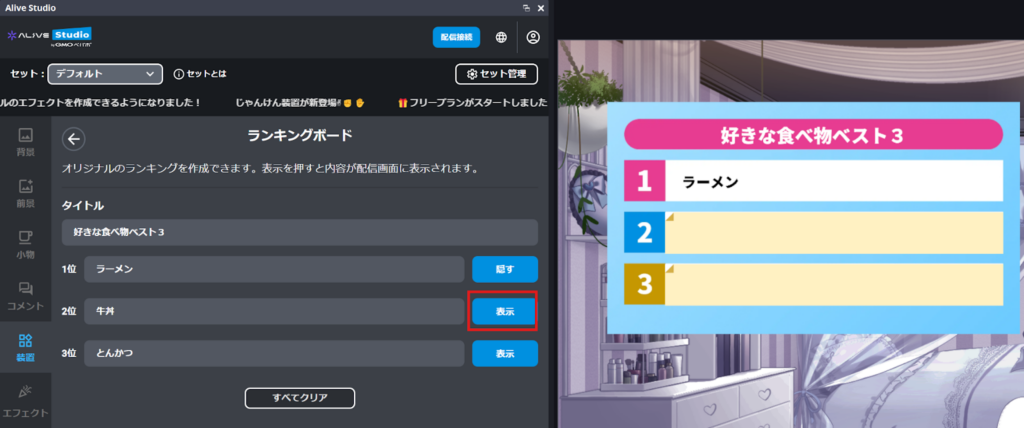
Moreover, since the ranking can be displayed one item at a time, it’s easy to deliver an engaging performance where announcements are made in order from “3rd place → 2nd place → 1st place,” naturally attracting viewers’ attention.
Furthermore, this Ranking Board is available on the free plan.
Cases where interest in new streaming performances and participation-type projects exists but hesitation arises due to cost concerns are not uncommon.
With Alive Studio, you can start using it for free, verify its effects in actual streams, and expand upon usage methods suited to your streaming style.
Honestly, coming up with projects is the hardest part. If I spend too much time preparing, streaming itself becomes a chore.
With the Ranking Board, just gathering themes while chatting and announcing the results can make for a great project!

Stream Project Ideas Using the Ranking Board
The Ranking Board can be used not only for ranking announcements but also for displaying quiz and survey results.
By setting themes you like and announcing the ranks, or summarizing and showing answers or reactions that come up during the stream, you can create a stream that progresses like a TV show, which is very appealing.
Here, we introduce specific streaming project examples using the Ranking Board.
Casual Chat Streams in Ranking Format
The Ranking Board can be easily incorporated into casual chat streams as well as well-structured projects.
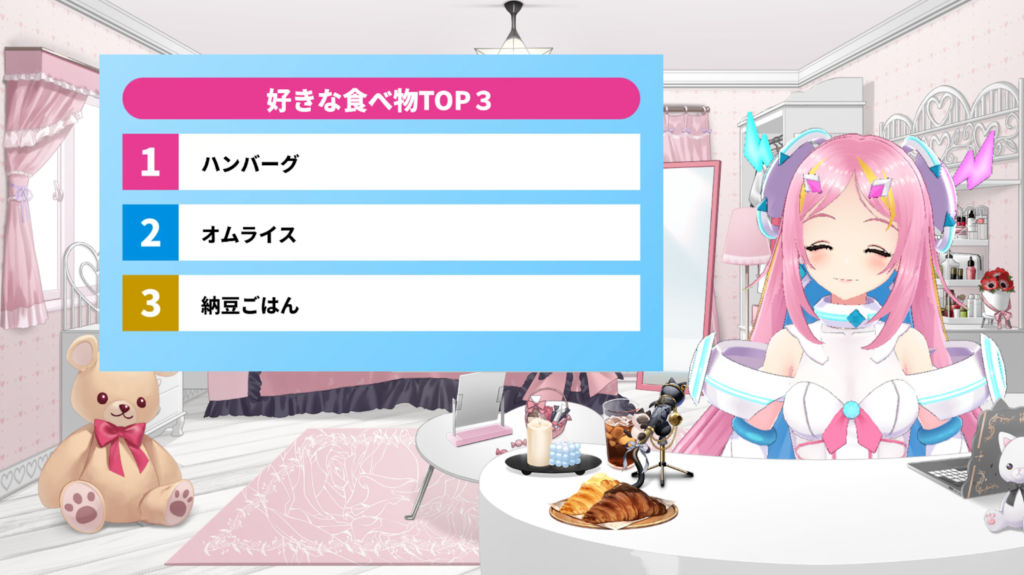
For example, during a casual chat, if you bring up the topic “If you were to rank your favorite foods?”, simply announcing them in the order of 3rd place → 2nd place → 1st place can naturally create a sense of rhythm in the talk.
It is also recommended to solicit topics from listeners and have the streamer announce them in a ranking format.
Quiz & Fake Guessing Triple Choice Game
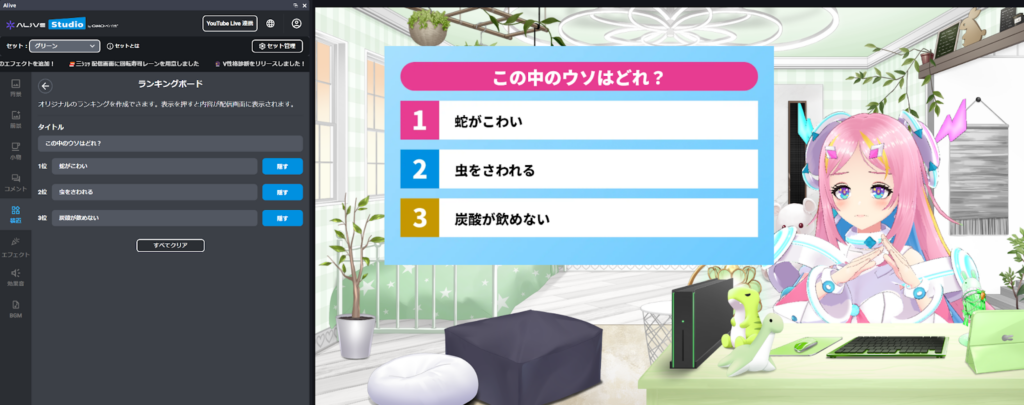
The Ranking Board is also compatible with quiz projects such as fake guessing games. It naturally encourages comment participation by having listeners deduce the answers.
Publicizing Survey Results
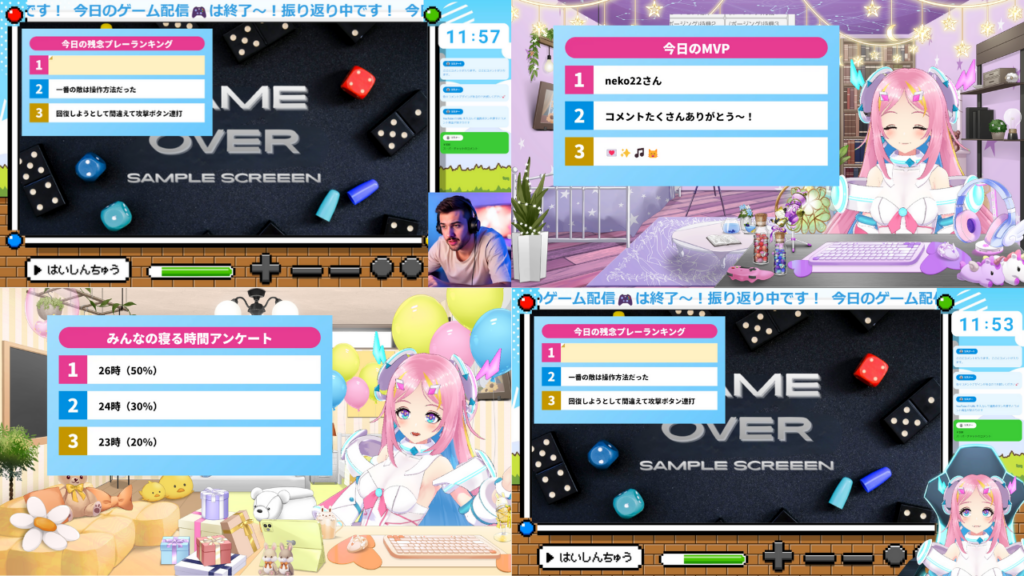
Another option is to use the Ranking Board to reveal survey results taken before the stream on the spot. By simply showing “which choice was the most popular” in rank order, you can create an exciting result announcement time.
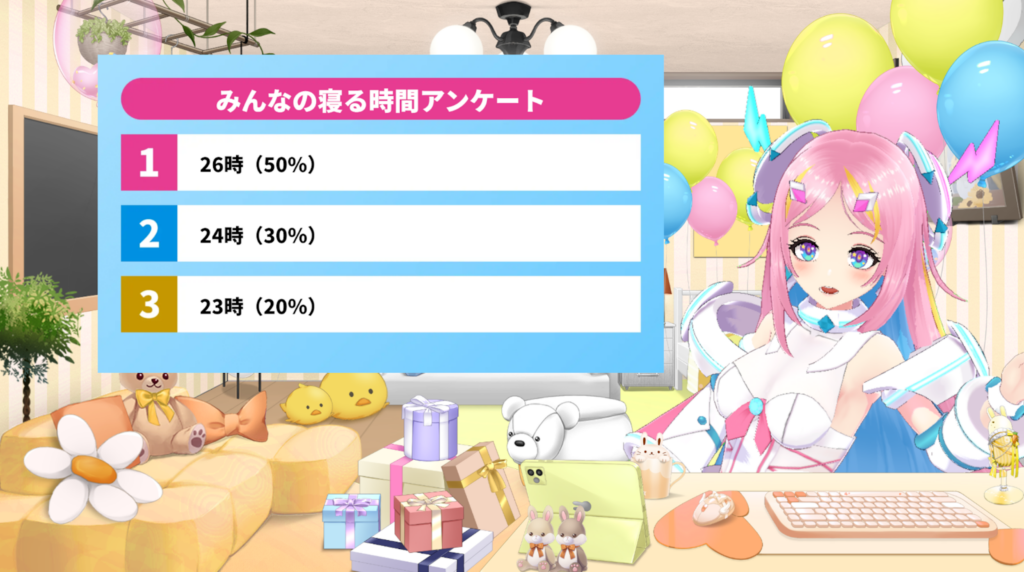
Award Board Style
It’s also effective to use the Ranking Board in an award board style.
For example, by presenting “Today’s Top Commenter is so-and-so!” you can create excitement as a conclusion to the stream.
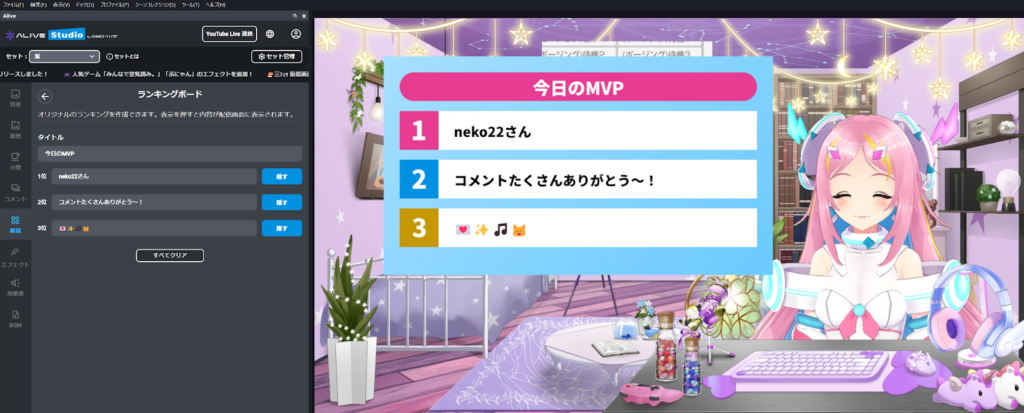
Memorable Scenes & Comments Ranking
Picking up and announcing memorable scenes or comments from the stream in ranking format naturally serves as a wrap-up or review project for the stream.
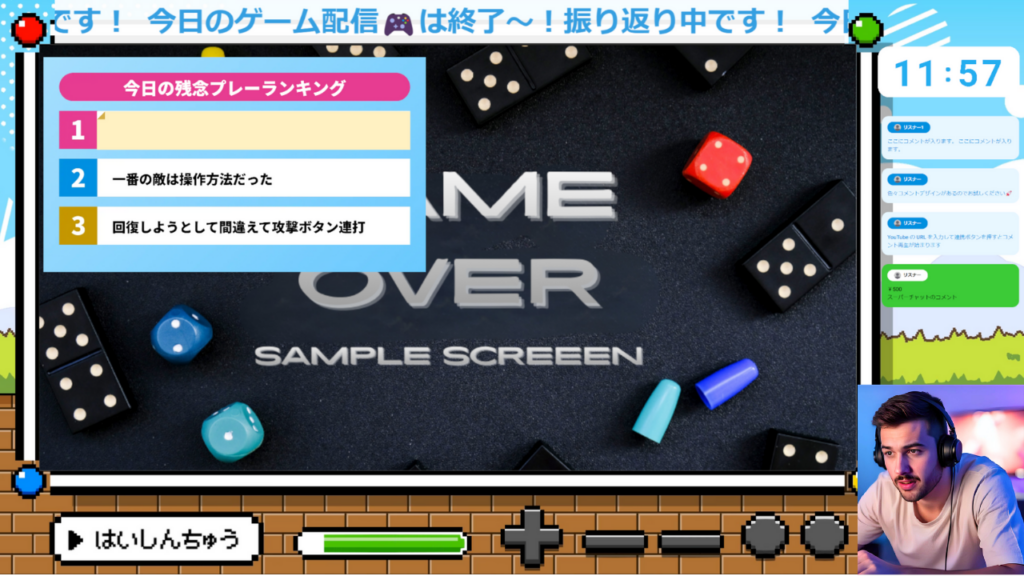
By compiling these moments over daily streams, they can be used in monthly or anniversary review streams.
For instance, in a monthly review stream, you can set themes such as “This Month’s Memorable Scenes Ranking” or “This Month’s Top Comments Ranking” and share behind-the-scenes stories while announcing them in order. This naturally creates a review project. The aspect of preserving exciting moments as “official memories” also makes it easy to continue as a regular project.
With a comment ranking, viewers will find it easier to comment as they anticipate that “my comment might be chosen.”
For monthly or anniversary streams, setting the theme as something like “Most Memorable Streams Ranking” allows viewers to share the memory of “That stream was fun,” and enhances their attachment to the channel.
Scoreboard Style
It is possible to display karaoke scores or game scores using the scoreboard style.
In such cases, viewers can watch and understand the results as an open concept by displaying all items in advance.
Advanced Projects Combining Devices
In Alive Studio, you can combine up to three devices in a single scene.
Therefore, combining multiple devices like “Ranking x Topic Roulette” is easily achievable.
By developing discussions based on a theme roulette and summarizing the content in a ranking format, you can create an engaging project where you’re able to deliver stories smoothly and get viewers to participate in guessing the order.
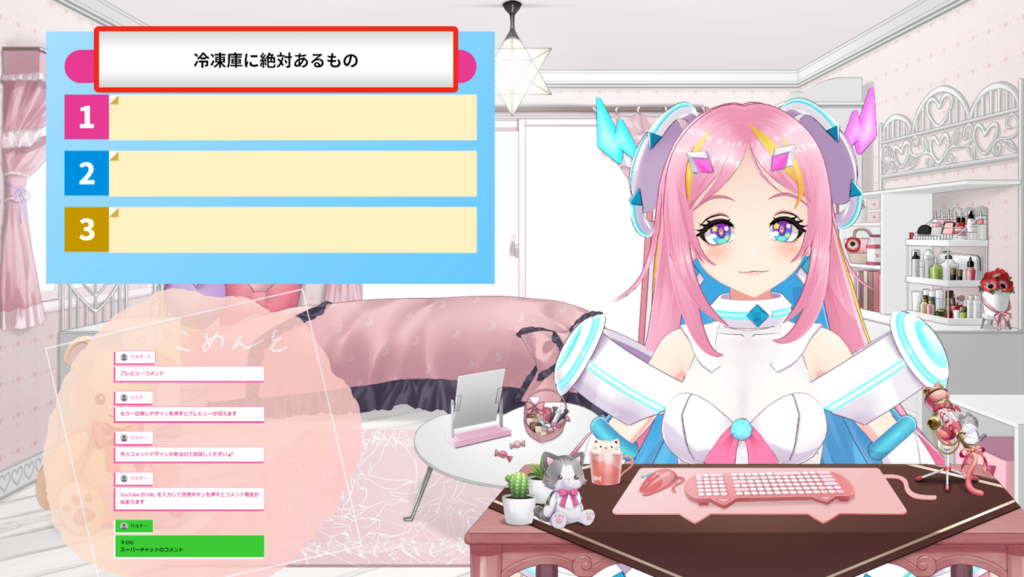
Setting the topic roulette on Alive Studio is also easy. For more details, please check the articles below.
Just having the ranking appear on the screen creates an “event feeling” in the stream.
From the viewers’ side, it’s easier to comment naturally by looking at the streaming screen.
How to Use (Set Up) the Ranking Board
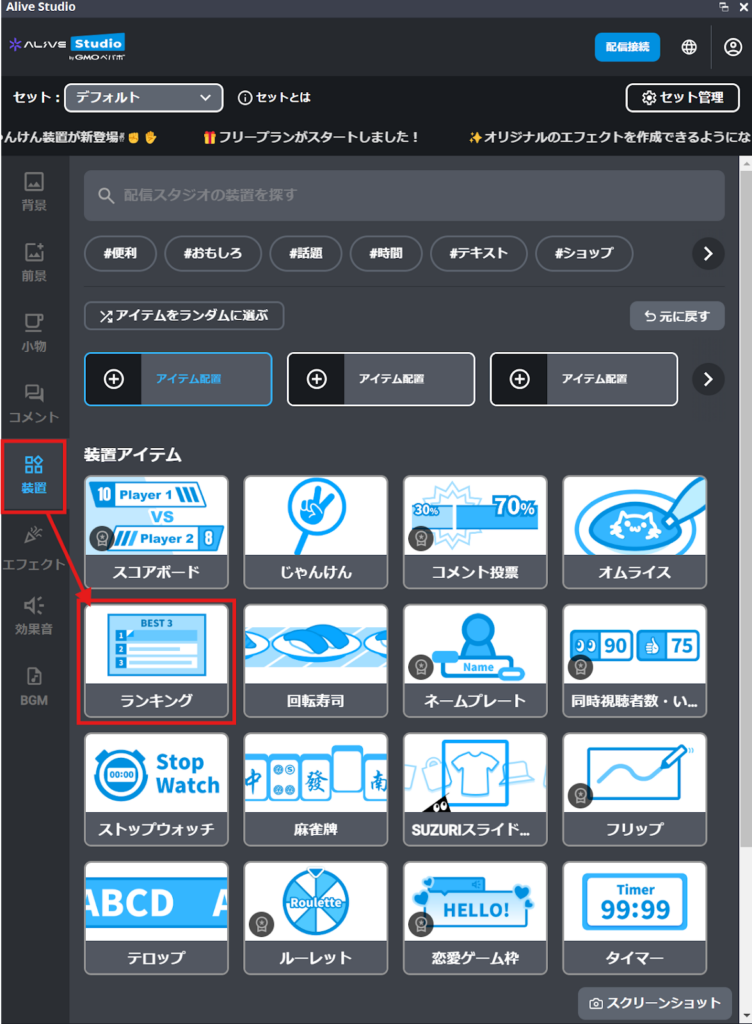
The Ranking Board of Alive Studio can be easily set up from OBS.
1. Click Device > Ranking
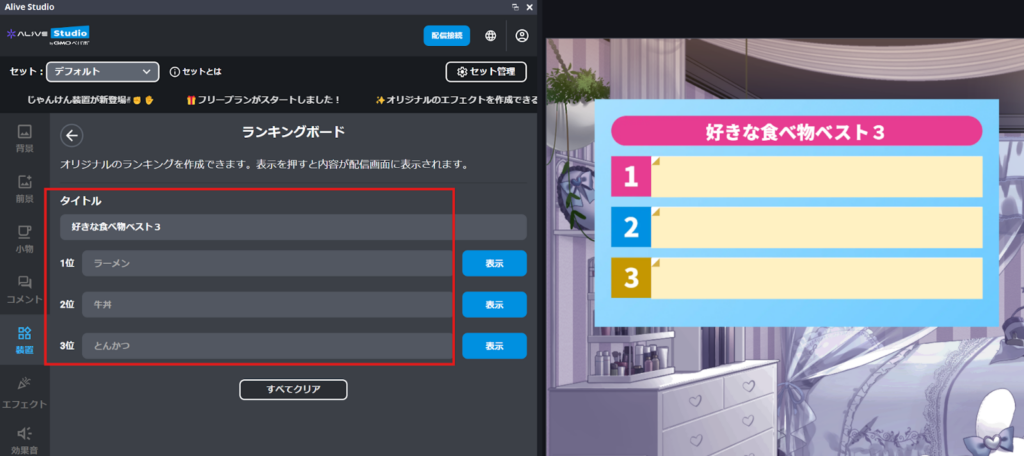
2. Enter the “Title” and “1st to 3rd Place” content from the gear icon at the top right
3. Open to the stream screen with the blue “Display” button!
Start Here|How to Register with Alive Studio (Free)
For those who haven’t registered with Alive Studio, here’s a simple registration walkthrough. The Ranking Board can be tried immediately even with a free plan. The registration process is quite straightforward.
Register an Account (Free) and then prepare by following the steps below.
Step 1. Download the Dedicated Script
Step 2. Register with OBS
Start OBS and click “Tools” > “Scripts”.
Press the “+” button to select the downloaded script.
Select the scene where you want to add “Alive Studio” and press the “Add” button.
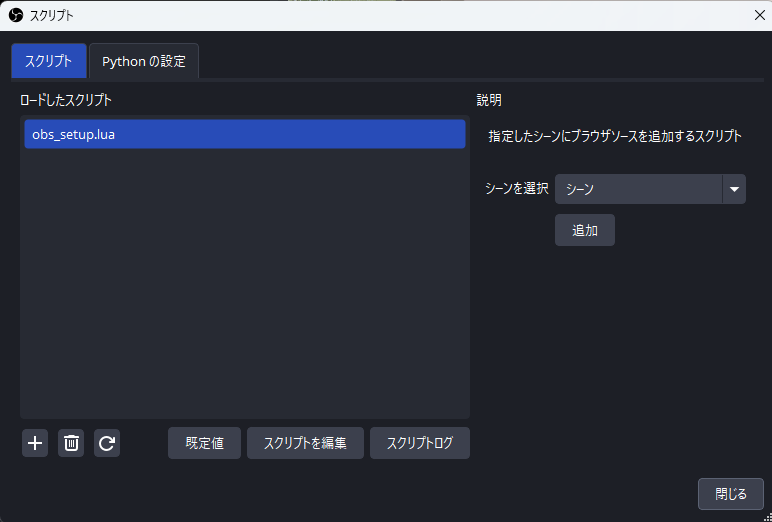
Step 3. Add Custom Browser Dock
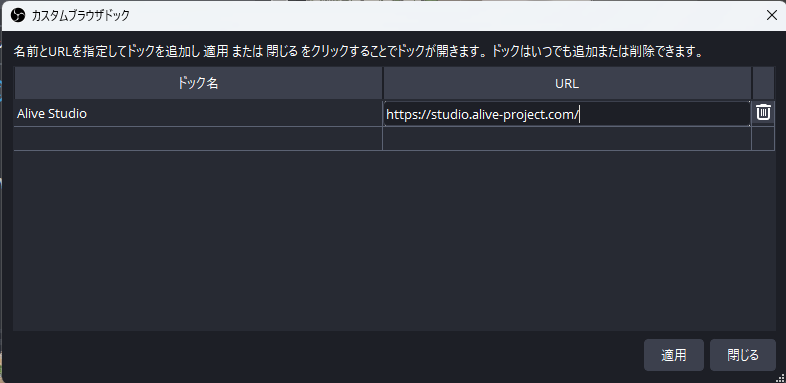
Click “Dock” > “Custom Browser Docks” from the OBS menu.
Enter the following URL and click “Apply”
| Dock Name | URL |
|---|---|
| Alive Studio (Optional) | https://studio.alive-project.com/ |
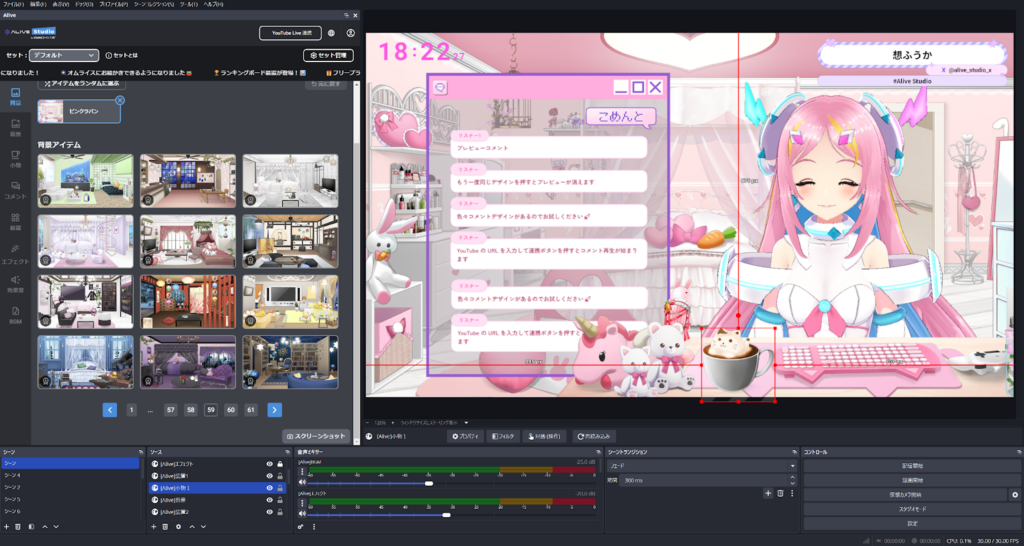
Once set up, the Alive Studio screen appears on OBS.
Conclusion
The concerns that arise while continuing streaming like “Can’t come up with projects” or “Want to shorten the distance with viewers” can often be resolved by changing the system slightly.
Alive Studio’s Ranking Board can be used in conjunction with OBS and does not require complex settings. By using the Ranking Board, you can flow more naturally to make streams rich and enable viewers to comment easily, even without special presentations or advanced skills, which can create purpose and excitement in streaming.
When you start feeling the monotony, why not update your stream using the ranking format?