


Share


How to Start Streaming on IRIAM: A 6-Step Beginner’s Guide to V-Liver Live Streaming
“I’m curious about becoming a V-Liver, but I don’t have expensive equipment or technical know-how.” “I want to start streaming without showing my face.” If that sounds like you, you’re not alone.
For people in that exact spot, there’s a free app called IRIAM — all you need is a smartphone and one illustration to debut as a V-Liver.
This article walks through how to start streaming on IRIAM in six beginner-friendly steps. You’ll get the basics — app registration, illustration prep, your first stream — plus strategies for a successful debut, tips for growing an audience, and how monetization works.
If you’re thinking about starting your streaming journey, use this as your roadmap.

What Is IRIAM? A V-Liver Streaming App You Can Start With Just a Smartphone
IRIAM is a free streaming app that lets anyone debut as a V-Liver today using just a smartphone and a single illustration — no face cam required. There’s no need for specialized work like Live2D modeling, and the risk of accidentally revealing your identity is minimal. That accessibility is what makes IRIAM stand out.
Let’s look at what makes IRIAM unique from two angles.
Become a V-Liver With Just One Illustration
All you need is a single standing-pose illustration (PNG format) to become a V-Liver on IRIAM — no upfront cost required.
Normally, becoming a V-Liver requires specialized work like Live2D modeling to bring an illustration to life, which costs both time and money.
IRIAM, however, uses your smartphone camera to read your expressions, and AI animates the illustration automatically — including blinking and mouth movements. No technical knowledge or upfront investment is needed.
The recommended illustration specs are below.
| Item | Recommended |
|---|---|
| Image size | Width ≤ 2,000px × Height ≤ 4,000px |
| Format | PNG (transparent background) |
| File size | Under 20MB |
| Resolution | 350dpi |
Source: IRIAM “Illustrator’s Guidebook Ver.3”
Motion Live Technology With Just 0.1-Second Latency
IRIAM streams have almost no time lag, which means you can talk with listeners in real time. You can respond to comments and gifts instantly, so even beginners can enjoy natural conversation.
The technology behind this is IRIAM’s proprietary “Motion Live” system. Instead of sending the camera video itself, only your facial movement data is transmitted. That keeps data usage low and trims latency to roughly 0.1 seconds.
Because no actual video is sent, there’s no risk of your real face leaking onto the stream.
How to Stream on IRIAM in 6 Steps
You can get started streaming on IRIAM in these 6 steps:
- Download the app
- Register an account
- Prepare your illustration
- Upload and test
- Configure stream settings
- Go live
The whole flow happens on a single smartphone — no PC or special streaming gear required. As far as becoming a V-Liver goes, this is about as simple as it gets.
Even if you’re nervous about setup or streaming itself, following each step in order will get you live without confusion.
Step 1. Download the App
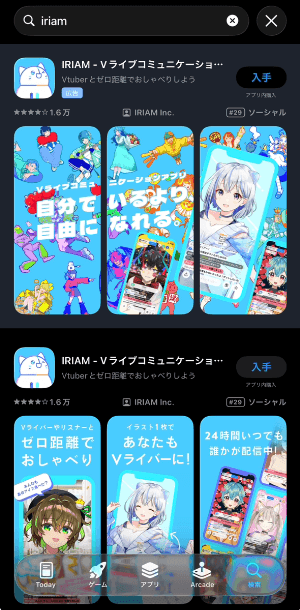
First, check that your smartphone is supported, then download the free app. There’s no official PC app, so you must use a smartphone — unofficial apps are not allowed.
You can download the app by searching “IRIAM” on the App Store (iOS) or Google Play. The required smartphone specs are below.
| OS | Minimum | Recommended |
|---|---|---|
| iOS | iOS 15 or later, iPhone 6s/6s Plus or newer | iOS 16 or later, iPhone 8/SE (2nd gen) or newer |
| Android | Android 10.0+, 64-bit CPU, 3GB+ RAM | Android 12.0+, 64-bit CPU, 4GB+ RAM |
Source: IRIAM “System Requirements”
Step 2. Register an Account
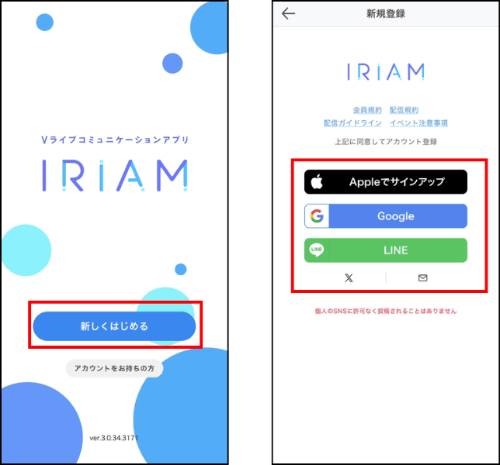
Open the IRIAM app, tap “Start New,” and choose how you want to sign in. You can pick from these five options:
- Apple ID
- Google account
- LINE
- X (formerly Twitter)
- Email address
During registration, you’ll be asked for your date of birth. This is your real date of birth — not your character’s. You can’t change it later, and some IRIAM features and streaming options are restricted by age, so enter it accurately.
Set a nickname and your account registration is done. You can tap “Skip for now” on the bio screen and fill it in later.
Step 3. Prepare Your Standing Illustration
To stream on IRIAM, you need one transparent PNG standing illustration. The recommended specs are:
- Width ≤ 2,000px × Height ≤ 4,000px
- PNG with transparent background
- Under 20MB
- 350dpi recommended
Illustrations facing forward at 5–8 head ratio, with hairstyles that don’t cover the eyes or mouth, tend to be recognized more accurately.
There are four main ways to get your avatar illustration for IRIAM:
- Make it yourself: if you can draw, it costs nothing
- Commission a freelancer: order from an illustrator via skill marketplaces like SKIMA or Coconala
- Use free assets or the official page: IRIAM’s official “Draw a Character!” page also offers a preview feature so you can check how it’ll look in the app
- Join a V-Liver agency: some agencies provide illustrations
Your illustration must be original. Photographs, content that violates public morals, and anything that infringes third-party rights will be rejected during review.
Step 4. Upload Your Illustration and Test the Motion
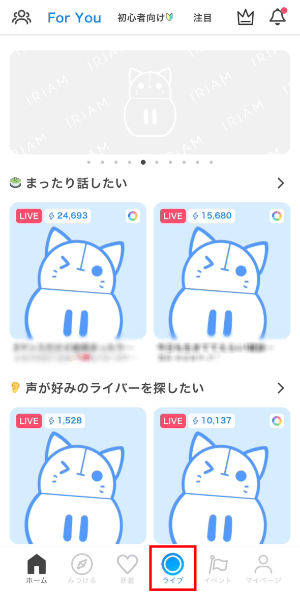
Tap the “Live” button at the bottom of the home screen and allow camera and microphone access.
Next, tap “Upload Illustration” and select the file from your phone.
After uploading, you’ll be asked to select a version. Choose the latest “Illustration Streaming Feature Ver.3” and upload.
When the upload finishes, you’ll see a preview screen. Move your face around to check that blinking and mouth movements are reflected correctly on the illustration. If everything looks good, tap “Confirm Character.”
There are 5 recognition modes available. If movements feel off, switching modes and re-uploading can help:
- Standard
- A
- B
- Mouth Correction 1
- Mouth Correction 2
After confirming the character, you can move to a screen where you can upload a mini-character (a 2–3 head ratio chibi version of your main illustration), set background images, and adjust motion strength.
Step 5. Set Your Stream Title and Tags
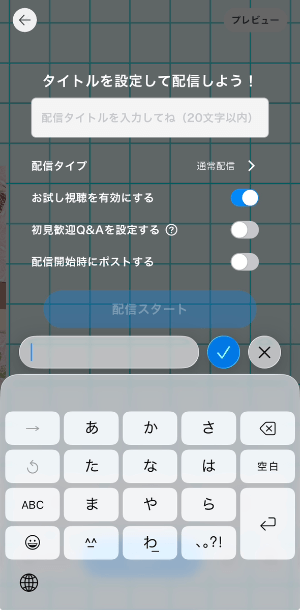
Once your character setup is done, you’ll move to the streaming prep screen. For the title, something like “First Stream! Just Chatting” or “Singing Stream ♪” — a title where the content is clear at a glance — helps new listeners tap in.
Also set your “Profile Tags.” These are tags that express your personality and interests. You can register up to 8 on your profile. Listeners can search streams by Profile Tag from the “Discover” tab, so set at least 3–4 to start.
Note that IRIAM doesn’t allow users to create new tags — you select from a preset list organized by genre.
Step 6. Start and End Your Stream
Tap the “Start Stream” button on the prep screen and you’re live. During the stream, you’ll see a listener list, an excitement gauge, and a comment feed — use them as cues for reactions.
When you’re ready to end the stream, tap the door icon in the top-left. Before ending, thank the listeners who are still in the room and say goodbye — this small habit goes a long way toward retaining listeners on IRIAM. After the stream ends, data like duration, viewer count, and comment count is shown automatically — use it to improve next time.
A smartphone’s built-in mic is enough to get started, but using an external mic (like a USB condenser mic) or earphones delivers clearer audio. If you want details, check the article below.
>>IRIAM Streaming Equipment Guide: Must-Have Gear and Budget-Based Setup Recommendations
How to Start Radio-Style Streams on IRIAM
IRIAM supports audio-only “radio-style streams.” It’s a great option if your illustration isn’t ready yet, or if you just want to enjoy voice-only chat sessions.
The procedure is the same as a regular stream: just tap the “Live” button. If you’ve already registered an illustration, you can choose to keep it displayed or hide it before going live.
To play BGM during your stream, you can either play music from a separate device (like a PC) and pick it up with your phone’s mic, or connect dedicated equipment (such as a mixer) directly. The IRIAM app itself doesn’t have a built-in BGM playback feature.
If you use songs managed by JASRAC or NexTone, be sure to file a report through “Used Songs Report” on your in-app My Page.
Source: IRIAM “Music Usage During Streaming”
* Specifications are subject to change. Check the official help center for the latest information.
If you want to stream with BGM playing, check the article below for details.
>>How to Play BGM and Music on IRIAM Streams: No-Equipment Methods and Where to Find Tracks
How to Do Game Streaming on IRIAM
By combining IRIAM with other tools, you can do game streaming too. The IRIAM app itself doesn’t have a screen capture feature, so “Can I stream games on IRIAM?” is a common question — but yes, you can, using one of these two methods:
- Use Discord screen share: show the game screen to your listeners via Discord while doing voice-only commentary on IRIAM
- Stream on YouTube Live or Twitch in parallel: broadcast the game footage on YouTube or Twitch while streaming on IRIAM simultaneously
One thing to watch: before you start a game stream, always confirm the game allows streaming. You need to follow the copyright rules the publisher has set.
For a detailed guide on starting game streams, see the article below.
>>Beginner’s Guide to Game Streaming: Starting Steps to Platform Choice!
Debut Week Strategy to Avoid Mistakes on Your First IRIAM Stream

If you want to grow your fanbase, how you spend the first week (Debut Week) matters a lot. The first stretch after your debut is a bonus window where you’re more likely to catch listeners’ eyes inside the app.
On IRIAM, livers within 2 weeks of debut appear in the “Debut” tab, and livers within 30 days appear in the “Rookie” tab. When users open the app, the tabs are ordered “Featured → Debut → Rookie,” which makes it easy to discover new livers.
To make the most of this one-time chance, here’s what to prep before your first stream — plus the best timing to go live.
Visit 3–5 Other Livers’ Streams Before Your Debut
Before your first stream, visit other livers’ streams 3–5 times. On IRIAM, visiting other people’s streams is called “waku-mawari” (room rounds) or “risu-katsu” (listener activity), and it’s an essential habit for active livers.
There are three main reasons to visit ahead of time:
- To get a feel for the app and the vibe of listener interaction
- To get other livers and listeners to know you, so you have an audience for your debut
- To learn from skilled livers how to talk and energize the room
When you enter a room, greet with a “Nice to meet you” and send Stars (a free reaction feature) to liven up the stream. Engage in the comments, and casually mention your name and your debut schedule — sometimes listeners will say “I’ll come cheer you on!”
The Best Debut Timing Is Friday–Sunday Evening, 8–10 PM
Rather than going live on impulse, aim for Friday through Sunday evenings between 8 PM and 10 PM, with a 1–2 hour, slightly longer-than-usual stream. Posting a schedule for your first week on your profile and social media makes it even more effective.
Why weekend evenings? That’s when active users on the app peak. When you appear in the “Debut” tab, more people are around to find you.
Going longer also raises the chance of meeting new listeners who drop in mid-stream.
That said, a first stream can be more nerve-wracking and tiring than expected — never push yourself too hard.
5 Tips to Become Popular on IRIAM
To gain popularity on IRIAM, focus on these five practices:
- Build out your profile
- Stick to a fixed stream schedule
- Be attentive to listeners
- Keep visiting other livers’ rooms
- Join events
Tons of livers are active on IRIAM every day, so just streaming consistently isn’t always enough — you can get buried.
Let’s break down the tips one by one.
Build Out Your Profile and Self-Introduction
Flesh out your profile to grow on IRIAM. Your profile is the main entry point for people getting to know you.
A bio that’s just “Hi, I’m ◯◯! Nice to meet you!” doesn’t convey your appeal. Try to include these five elements:
- Greeting and name (and your signature greeting, if you have one)
- Basic character profile
- Things you like and are good at
- Your goals on IRIAM
- When you stream (your schedule)
Tailoring your profile picture (thumbnail) to your stream content, or modeling it on senior livers, also helps new listeners notice you.
Fix a Stream Schedule So Listeners Remember You
To become a popular liver, keep your streaming pace consistent. Streaming on the same day and time slot 3–5 times a week makes it easy for listeners to remember “◯◯-san’s stream is on this day” and helps build a regular audience.
Also, your IRIAM Community Rank as a liver is calculated based on daily cheer points, so streaming more often makes it easier to climb.
Once you’ve set your schedule, announce it in advance on your profile and social media so listeners can easily plan to drop by.
Boost Listener Retention by Reading Comments and Thanking Gifts
The key to turning listeners into fans is careful one-on-one interaction. Three things to prioritize:
- When someone enters, greet them by name
- Read comments out loud and react to them properly
- When you receive a gift, thank them right then and there
Even with a small audience, that means a chance to really talk with each listener. Someone who feels remembered will come back for the next stream.
Visit Other Livers’ Streams to Build Mutual Audiences
To grow your reach, don’t stay locked inside your own stream. Even after your debut, keep visiting other livers’ streams.
Connecting with livers who are active in the same time slots leads to listener cross-pollination, which is a major source of new fans.
Being on the listener side also teaches you what makes a stream fun and how it feels to be acknowledged — insights you can apply to improve your own streams.
Join IRIAM Events to Aim for the Top of the Rankings
To get noticed by new listeners, actively join in-app events.
IRIAM is constantly running events, and prizes for ranking high can include perks like custom poster production. “I’m a beginner, I’d be nervous…” is a common feeling, but the system pairs you against livers of similar rank (activity level), so you don’t have to worry.
Events are a big opportunity to grow your fanbase — give them a try.
How Monetization Works on IRIAM
Once you meet certain conditions on IRIAM, you can monetize and start earning “Diamonds,” which can be exchanged at a rate of 1 Diamond = 1 yen.
There are two types of Diamonds that count toward earnings:
- Cheer Diamonds: Diamonds you receive based on how lively the stream gets — from listener gifts, comments, and so on
- Time Diamonds: Diamonds you’re guaranteed to receive based on your daily stream duration and rank
Free livers (not affiliated with an agency) need to apply for monetization after meeting all three of the following:
| Condition | Requirement |
|---|---|
| Stream time | 15+ hours |
| Stream days | 10+ days |
| Cumulative points | 5,000+ points (from gift points used in streams) |
Points from login bonuses and tutorial missions aren’t counted toward this total, so keep that in mind.
Diamonds you earn expire 180 days after acquisition, so cash them out regularly before they vanish.
If you’re planning to become a liver, it’s worth understanding these monetization rules and expiration dates ahead of time.
Source: IRIAM “About Monetization”
Source: IRIAM “About Diamonds”
* Rates and revenue sharing are subject to change. Check the official platform information for the latest terms.
Summary
IRIAM is an app that lets anyone become a V-Liver for free with just a smartphone and one illustration.
Preparation is straightforward: follow the 6 steps from downloading the app to starting your first stream, and even beginners can get to “live” without getting lost.
After your debut, use the newcomer window (Debut Week) to get yourself in front of as many people as possible. Talk attentively with listeners, visit other streams (waku-mawari), and stick to the fundamentals — you’ll build a fanbase steadily.
Keep streaming consistently, clear the requirements (15+ hours, 10+ days, 5,000+ cumulative points), and you can unlock monetization too.
Download IRIAM and take your first step as a V-Liver.