


Share


IRIAM Tutorial Missions Guide: How to Clear All 13 and Prepare for Your V-Liver Debut
“What is the IRIAM tutorial?” “How far should I go with it?” “Does it help me prepare to stream as a new liver?” If you’ve just joined IRIAM, you may be wondering about all of these.
The IRIAM tutorial is a beginner-friendly system that lets you earn free points while trying out basic features like streaming and watching. Through watching, commenting, following, and sending gifts, you’ll also learn how viewers interact with livers and show their support during a stream.
This guide covers all 13 tutorial missions and their rewards, tips for clearing them all efficiently, things to watch out for, and how to prepare for your V-Liver debut along the way.
If you learn how IRIAM works while completing the tutorial, you’ll be able to use your experience as a viewer to shape your own streams later.

What Is the IRIAM Tutorial?
IRIAM’s tutorial missions are a beginner-friendly system designed to help you learn the app by trying out basic features like streaming and watching. You also earn rewards for completing missions, so they’re well worth doing when you first start.
Below, we’ll cover two key points, including how far you need to go to earn the rewards:
- Rewards for clearing every mission
- How to check your progress
Let’s take a closer look.
Rewards for Clearing Every Mission
Complete all of IRIAM’s tutorial missions and you’ll earn a total of 480 free points. Each mission rewards around 10 to 50 points, and you get an extra 200 points for clearing them all. Note that mission content and how it’s displayed may vary depending on the user.
You can use these free points to send gifts to livers during their streams, so you can experience supporting and interacting with livers without spending money. Sending gifts also tends to get a reaction from the liver, making it a great way to discover what makes watching on IRIAM unique.
If you’re new to IRIAM, collect points through the tutorial first and then try out the gift feature. It’s an easy way to get a feel for how watching streams works.
How to Check Your Progress
You can check your tutorial mission progress from My Page in the app. Since it shows everything you’ve completed in a list, it’s easy to see what’s left and which mission to tackle next.
Here’s how to check your progress:
- Open the IRIAM app and go to My Page

- Tap “Tutorial Missions”
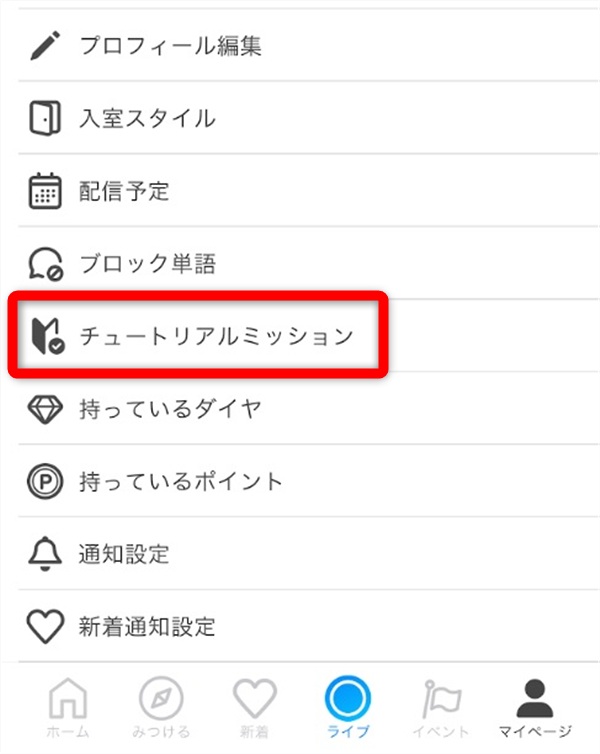
- Check your incomplete missions, progress, and rewards
Completed missions are reflected in your progress, so you can work through them one by one while checking what’s left. Starting with missions you can finish quickly also helps you understand how the tutorial works as a whole.
All 13 IRIAM Tutorial Missions and How to Complete Them

Here are all 13 IRIAM tutorial missions and how to complete them, grouped into four types:
- Login missions
- Watching missions
- Action missions
- Gift missions
Let’s go through them one at a time.
Login Missions
The table below shows the reward and steps for the login mission.
| Mission | Reward | How to Complete |
|---|---|---|
| Log in 2 days in a row! | 30 points | Log in to IRIAM on day one, then open the app and log in again the next day |
The login mission is easy to do, but it can’t be completed until the next day. Work on other missions on day one, then check your progress when you log in the following day to keep things moving efficiently.
Watching Missions
The table below shows the rewards and steps for the watching missions.
| Mission | Reward | How to Complete |
|---|---|---|
| Watch a stream! | 10 points | Choose a liver who is currently streaming on IRIAM and enter their stream room |
| Watch a stream for 1 minute! | 10 points | Watch a stream continuously for at least 1 minute |
| Watch a stream for 5 minutes! | 10 points | Watch a stream continuously for at least 5 minutes |
| Watch a stream for 15 minutes! | 20 points | Watch a stream continuously for at least 15 minutes |
| Watch 5 different livers! | 30 points | Enter and watch streams from 5 different livers |
| Watch streams for 120 minutes! | 50 points | Watch streams for a total of 120 minutes |
Watching missions range from simply entering a stream to watching for 120 minutes. Work through the shorter missions first while watching several livers, and you’ll find it easier to complete other tutorial missions at the same time.
Action Missions
The table below shows the rewards and steps for the action missions.
| Mission | Reward | How to Complete |
|---|---|---|
| Comment while watching! | 10 points | Send one comment from the comment field on the stream screen |
| Send a star while watching! | 10 points | Tap the “☆” at the bottom right of the stream screen to send a star |
| Follow a liver while watching! | 10 points | Tap the follow button for the liver you’re watching |
| Send 10 comments while watching! | 20 points | Send a total of 10 comments while watching streams |
| Send 50 comments while watching! | 50 points | Send a total of 50 comments while watching streams |
Stars on IRIAM are a free support feature you can send as many times as you like, which makes this one of the easiest missions to complete. The comment missions require up to 50 comments, so rather than racking up numbers with greetings alone, join the conversation naturally based on what’s happening in the stream.
Gift Missions
The table below shows the reward and steps for the gift mission.
| Mission | Reward | How to Complete |
|---|---|---|
| Send a gift while watching! | 20 points | Choose a gift from the stream screen and send it to the liver you’re watching |
Gifts are a feature for supporting livers on IRIAM, and sending one costs points. You can use the free points earned from the tutorial, so even first-timers can complete this mission without paying.
There are many types of gifts, so pick one you can afford with the points you have. If you do this during the same stream as your watching and action missions, you can complete several missions at once.
For more on IRIAM gifts, check out this article:
>>Complete IRIAM Gift List [2026]: Categories, Point System, and Stream Event Ideas
Tips for Clearing All IRIAM Tutorial Missions Efficiently
Here are some tips for completing all of IRIAM’s tutorial missions efficiently:
- Prioritize the watching missions
- Comment and follow while you watch
- Save the gift mission for last and use the points you’ve earned
Let’s look at how to work through the missions efficiently.
Prioritize the Watching Missions
To move through the tutorial efficiently, start by opening streams and building up watch time. The watching missions include 1-, 5-, 15-, and 120-minute goals, so the longer you watch, the more of them you can complete at once.
There’s also a mission for watching 5 different livers, so it’s more efficient to browse several livers instead of sticking with just one from the start. Each liver has a different vibe and style, so watching more streams also helps you find the ones you enjoy.
Once you find a liver you like, commenting and following come more naturally. By building watch time first while finding people to interact with, you can work on several missions at once without forcing it.
Comment and Follow While You Watch
You can get through IRIAM’s tutorial missions much faster by commenting and following while you watch. Since you complete other actions while building watch time, there’s no need to re-enter a stream for each mission.
When you find a liver you like, send comments that fit the stream and follow them when it feels natural. Some missions require a certain number of comments, but joining the conversation instead of just padding the count keeps it from feeling like a chore.
Doing the watching and action missions together makes it easier to clear several requirements, even when you’re short on time.
Save the Gift Mission for Last and Use the Points You’ve Earned
We recommend saving the gift mission for last and using the points you earned from earlier missions. If you finish watching, commenting, stars, and following first, you’ll have enough points to send a gift without paying anything.
Gifts on IRIAM are sent to livers by spending points, so there’s no need to pay from the start. Work on the watching and action missions first, then choose a gift you can send with the points you’ve saved.
Leaving the gift for last lets you finish the tutorial using its own rewards and avoid buying points you don’t need.
Why New IRIAM Users Should Clear Every Tutorial Mission

Here’s why we recommend that IRIAM beginners clear every tutorial mission:
- It gives you ideas for your own streams
- It helps you fit into the community
- It teaches you how to liven up a stream
Beyond the rewards, let’s look at how the tutorial can benefit your future streaming.
It Gives You Ideas for Your Own Streams
Working through the tutorial missions lets IRIAM beginners experience firsthand how viewers collect points and send gifts. Going through the process of watching, commenting, following, and finally sending a gift helps you understand what kind of stream makes people want to support a liver.
Watching several livers also lets you compare how they respond to comments and expand on topics. When you start streaming yourself, this gives you ideas for inviting viewers to join in and creating an atmosphere where they feel comfortable sending gifts.
If you’re a beginner aiming to become a liver, experiencing the full viewer journey before you stream will help you build more practical streams.
For a beginner’s guide to streaming on IRIAM, check out this article:
>>How to Start Streaming on IRIAM: A 6-Step Beginner’s Guide to V-Liver Live Streaming
It Helps You Fit into the Community
IRIAM shows a beginner mark on new accounts after sign-up, so others can easily tell you’ve just started. If you join streams aimed at beginners, the livers are already expecting newcomers, so it’s easier to comment and ask questions.
Asking experienced livers about things like how they run their streams or respond to comments can help with your own stream preparation. As you interact more, you’ll gradually get a feel for IRIAM’s unique atmosphere and how people relate to each other in the community.
Making the most of the period when your beginner mark is shown lets you build friendly connections before you even start streaming.
It Teaches You How to Liven Up a Stream
When you send a real gift using points from the IRIAM tutorial, you get to experience the moments that liven up a stream from the viewer’s side. Watching how livers react and respond to gifts shows you what kinds of reactions viewers enjoy.
Even for the same gift, livers react differently: some call out the viewer’s name, some say thank you, and some use it to start a new topic. Comparing several streams helps you decide which responses you want to use in your own streams and which to avoid.
Sending gifts with your reward points is a chance to learn how streams are livened up without spending money.
Things to Watch Out for When Doing the IRIAM Tutorial
Here are some points to keep in mind when working through the IRIAM tutorial:
- Avoid streams that don’t welcome point farming
- Don’t spam meaningless comments
- Set your “Entry Style”
Let’s go over how to complete the missions while being considerate of livers and other viewers, rather than focusing only on clearing them.
Avoid Streams That Don’t Welcome Point Farming
When doing the tutorial on IRIAM, avoid streams that don’t welcome viewers who are only there to collect points. Some livers value interacting with viewers who genuinely enjoy their streams and may not like point-focused behavior.
Before entering, check the liver’s profile and stream title, and choose streams that say things like “beginners welcome” or “missions OK.” If a stream clearly says point farming isn’t welcome, don’t force it; find another stream instead.
By respecting each liver’s policy instead of focusing only on the tutorial, you can avoid unnecessary trouble on IRIAM.
Don’t Spam Meaningless Comments
Even when working on the comment missions, avoid sending meaningless text over and over. Comments made just to boost your count can disrupt the flow of the stream and make the liver and other viewers uncomfortable.
Even when aiming for 50 comments, focus on things that lead to conversation, such as greetings, reactions to the stream, or questions about how to use IRIAM.
The comment missions are a chance to experience interacting with livers. If you focus on joining in naturally instead of just hitting the numbers, you’ll find it easier to fit into the IRIAM community.
Set Your “Entry Style”
If you’d like to watch streams quietly on IRIAM, set your “Entry Style” (入室スタイル) from My Page. Entry Style is a feature that lets livers and viewers know how you’d like to spend your time in a stream.
If you want to hold back and just observe, choose the option “Think of me as just air at first…” (はじめは空気だと思ってください…). When you enter the stream of a liver you haven’t visited before or don’t follow, a log message appears letting them know you’d like to watch quietly.
Even when you’re making the rounds of multiple streams for the tutorial, this lets you check out each stream’s atmosphere at your own pace, without the pressure of being expected to interact right away.
Preparing for Your V-Liver Debut Alongside the IRIAM Tutorial
Here’s what you can do to prepare for your V-Liver debut while working through the IRIAM tutorial:
- Set up your streaming environment
- Make friends who’ll support each other’s first streams
- Announce your first stream on X (formerly Twitter)
Let’s check what to get ready in advance so your first stream goes smoothly.
Set Up Your Streaming Environment
If you’re aiming to debut as a V-Liver on IRIAM, start by preparing a smartphone and a streaming illustration to set up your environment. You can stream on IRIAM from a supported smartphone, with no need to buy a PC or expensive motion capture equipment.
With just one illustration that’s free of rights issues, your smartphone camera reads your facial expressions and movements so you can animate your character while streaming. If you use a smartphone you already own and an illustration you drew yourself, you can debut without spending anything on new equipment or artwork.
However, commissioning an illustration costs money, so getting started isn’t always completely free. You can also start with the bare minimum and add gear like a microphone as you keep streaming.
For more on the equipment you need for IRIAM streaming, check out this article:
>>IRIAM Streaming Equipment Guide: Must-Have Gear and Budget-Based Setup Recommendations
Make Friends Who’ll Support Each Other’s First Streams
As you prepare for your first stream, visit other livers’ streams while doing the tutorial and start building connections. If you’ve just started on IRIAM, you can find streams from the “For Beginners” (初心者向け) tab, making it easier to find ones you feel comfortable joining.
After entering, briefly introduce yourself with something like “I’m getting ready to become a liver” and comment naturally on the stream. This makes it easier for the liver and viewers to remember you. As you keep interacting, those connections may grow into people who come to your stream when you debut.
That said, don’t just promote yourself to get visitors for your first stream. What matters most is enjoying other people’s streams and building genuine relationships.
Announce Your First Stream on X (Formerly Twitter)
To draw viewers to your first stream, it helps to follow livers you like on IRIAM on X (formerly Twitter) as well, expanding where you can interact. Reacting to their posts after streams and interacting casually day to day makes it easier for people to remember your name outside IRIAM too.
For liver friends you’ve connected with through “waku-mawari” (room rounds), announcing the date and time of your first stream on X gives them a reason to drop by. Include not just the date and time but also what you’ll do on stream and that it’s your debut, so people are more likely to be interested.
Rather than repeatedly promoting yourself, announcing after building everyday connections is what naturally brings viewers to your first stream.
IRIAM Tutorial FAQ
Here are answers to common questions about the IRIAM tutorial:
- What if I can’t find the IRIAM tutorial?
- Do I need to pay to complete the IRIAM tutorial?
- How many days does it take to clear the IRIAM tutorial?
Let’s clear up any questions.
What If I Can’t Find the IRIAM Tutorial?
The IRIAM tutorial missions are located on My Page in the app. Once you’ve completed all of them and claimed your rewards, they’re hidden and can’t be displayed again.
Also note that if you’ve used the tutorial missions before, they won’t appear even if you create a new account.
Do I Need to Pay to Complete the IRIAM Tutorial?
In general, you can complete the IRIAM tutorial without paying. Even the gift mission can be completed using points earned from missions like watching and commenting.
There’s no need to buy paid points just to clear the tutorial. Save up free points first, then send your gift.
How Many Days Does It Take to Clear the IRIAM Tutorial?
You can clear the IRIAM tutorial in as little as 2 days. One mission requires logging in 2 days in a row, while the watching, comment, and gift missions can all be done on day one.
Finish every mission you can on day one, then log in again the next day to clear everything efficiently.
Summary
IRIAM’s tutorial missions are a beginner-friendly system that lets you earn free points while learning the basics, giving you hands-on experience with how streaming and watching work.
Start with the watching missions and comment and follow at the same time to clear several requirements efficiently. Then use the points you’ve earned to finish with the gift mission, and you can clear everything without paying.
Visiting other livers’ streams during the tutorial also teaches you how they respond to comments and liven up their streams.
If you’re planning to stream as a V-Liver on IRIAM, work through the tutorial alongside your debut preparations and put what you learn into your future streams.