

Share


Best PC Specs for VTubers: Choosing by Streaming Style and Price Range

“I want to start as a VTuber, but I’m not sure what kind of computer I need.” “I’m worried about the minimum specs required…” Many people may feel such anxieties. If you don’t have sufficient knowledge about PCs, it can be confusing to know what to base your selection on.
The necessary PC specs for VTubers vary depending on the streaming style. For chatting and singing streams, the standard is Core i5 with RTX 4060 or higher; for game streaming, Core i7 with RTX 4060 or higher; and for 3D streaming, Core i7 with RTX 4070 or higher.
In this article, we cover the specs actually used by major VTubers, how to choose parts, and recommended PC models. Please use this as a reference to find the right setup for you.

What are the required PC specs for VTuber streaming? Let’s understand the overall picture.
The PC specifications required for VTubers largely change based on streaming style. Due to the need to run streaming software and the VTuber model simultaneously, higher performance is required compared to general PCs.
Here, we will explain the necessary specs for three patterns: chatting & singing streams, game streaming, and 3D streaming.
Chatting & Singing Streams | Relatively Low Specs are Sufficient
Chatting and singing streams do not require game processing, making them the lightest streaming style in terms of load on the PC. The recommended specs are as follows:
| Parts | Recommended Specs |
|---|---|
| CPU | Core i5-13400F / Ryzen 7 5700X or higher |
| GPU | RTX 4060 / RTX 5060 or higher |
| Memory | 32GB |
| Storage | SSD 1TB or higher |
In VTuber streaming, multiple software applications like OBS (streaming software), VTube Studio (avatar display software), and browsers may be running simultaneously, leading to significant memory consumption. Streaming is possible with 16GB, but there can be instances of insufficient memory. If you are seeking a stable streaming environment, equipping 32GB will provide peace of mind.
With this configuration, it is also possible to stream light games while playing. This makes it easier to transition into game streaming in the future, which is an advantage.
Game Streaming | Need Ample GPU and Memory
Game streaming incurs a threefold load: game processing + encoding (process of converting video and audio into data) + drawing the VTuber model.
Besides having specs capable of running games, there needs to be spare capacity for streaming, so specs that are a step above a typical gamer’s PC are required.
| Parts | Recommended Specs |
|---|---|
| CPU | Core i7-14700F / Ryzen 7 9700X or higher |
| GPU | RTX 5060 16GB / RTX 5070 or higher |
| Memory | 32GB |
| Storage | SSD 1TB or higher (2TB recommended) |
By utilizing NVENC (hardware encoder) featured in NVIDIA GPUs (RTX series), you can significantly reduce the CPU load by offloading the encoding process to the GPU. Since the CPU tends to bear the burden during VTuber game streaming, the benefits of NVENC will be substantial.
3D Model Streaming | High-end GPU and 32GB or higher Memory Required
3D streaming requires simultaneous processing of motion capture, 3D rendering, and streaming encoding, making it the most demanding streaming style. Real-time rendering and encoding must be conducted simultaneously, necessitating a high-end configuration.
| Parts | Recommended Specs |
|---|---|
| CPU | Core i7-14700F or higher / Core Ultra 7 265K / Ryzen 9 7900X |
| GPU | RTX 4070 Ti SUPER / RTX 5070 Ti or higher |
| Memory | 32GB to 64GB |
| Storage | SSD 2TB or higher |
When handling VRChat or Unity-based 3D worlds, opting for a GPU with over 16GB VRAM (dedicated memory onboard the GPU) will result in even smoother performance.
In 3D streaming, aside from the main PC, you will also need tracking equipment such as VR headsets or motion capture devices. For those interested in learning more about streaming equipment, please refer to the following article.
>> Essential Streaming Gear for Aspiring VTubing: Beginner’s Guide
List of PC Specs Actually Used by Major VTubers
Many VTubers affiliated with major agencies utilize high-spec PCs of Core i9 with RTX 3070 or higher.
Here, we present the PC specs used by VTubers belonging to three agencies: Hololive, Nijisanji, and Vspo. Using specs from VTubers whose streaming styles are similar to your own can help inform your PC selection decisions.
PC Specs of VTubers Belonging to Hololive
| VTuber Name | YouTube Subscribers | Main Streaming Genres | CPU | GPU | Memory |
|---|---|---|---|---|---|
| Houshou Marine | About 4.32 million | Singing, chatting, drawing | Ryzen 9 9950X | RTX 4090 | ─ |
| Hoshimachi Suisei | About 2.84 million | Music, gaming (rhythm games) | Ryzen 7 5800X | RTX 3070 | ─ |
| Usada Pekora | About 2.76 million | Game streaming (RPG, survival) | Ryzen 9 9950X3D | RTX 5090 | 128GB |
| Shirakami Fubuki | About 2.65 million | Game streaming (FPS, chatting) | Core i9-13900F | RTX 4080 | 64GB |
| Sakura Miko | About 2.43 million | Game streaming (GTA, Minecraft, etc.) | Ryzen 9 7950X | RTX 4090 | 64GB |
*Information as of March 2026. It may have changed since then.
Looking at the GPUs, three out of the top five VTubers are using the highest-tier GPUs ranging from RTX 4090 to RTX 5090. On the other hand, cases like Hoshimachi Suisei, who continues to work with the RTX 3070, show that a high-end GPU is not necessarily required if you focus on music and singing streams.
PC Specs of VTubers Belonging to Nijisanji
| VTuber Name | Subscribers | Main Streaming Genres | CPU | GPU | Memory |
|---|---|---|---|---|---|
| Kuzuha | About 2.15 million | FPS (VALORANT, APEX), general gaming | Core i9-13900K | RTX 4090* | ─ |
| Kanae | About 1.57 million | FPS, general gaming, collaboration chats | Ryzen 9 5950X | RTX 3090 | 64GB |
| Tsukino Mito | About 1.48 million | Planning, chatting, game streaming | Ryzen 9 5950X | RTX 3090 | ─ |
| Kentaro Toya | About 1.21 million | Chatting, singing, game streaming | Core i9-9900K | RTX 2080 Ti | 32GB |
| Hoshikawa Sara | About 1.19 million | Game streaming, chatting, collaboration | Ryzen 9 5900X | RTX 3090 | 64GB |
*Information as of March 2026. It may have changed since then.
Compared to Hololive, the specs of Nijisanji often show a tendency toward the somewhat older RTX 3090 series. This is likely because in Nijisanji, streamers often choose and purchase their own PCs, which means the timing of the purchases directly influences the specs.
PC Specs of VTubers Belonging to Vspo
| VTuber Name | Subscribers | Main Streaming Genres | CPU | GPU | Memory |
|---|---|---|---|---|---|
| Tachibana Hinano | About 976,000 | FPS (VALORANT, APEX) | Core i9-12900K* | RTX 3070 | 32GB |
| Kurumi Noa | About 782,000 | FPS (APEX, VALORANT) | Core i9-12900K | RTX 3070 | 32GB |
| Ichinose Urha | About 747,000 | FPS (APEX), game streaming | Ryzen 9 5900X | RTX 3080 | ─ |
| Haname Sumire | About 734,000 | FPS (VALORANT, APEX) | Core i9-12900K | RTX 3070 | 32GB |
*Information as of March 2026. It may have changed since then.
Notably, the GPUs are focused on the RTX 3070 to 3080 range, and in FPS titles, settings can be reduced to prioritize frame rate over graphics quality, indicating that a top-tier GPU is not essential.
Meanwhile, CPUs like the Core i9-12900K are quite common, indicating a solid investment in the parallel processing needed for encoding and streaming.
Minimum Specs and Recommended Specs for VTuber PCs | How to Choose Parts
VTuber streaming requires a balance among CPU, GPU, memory, and storage. Even if one component is high-performance, if others become bottlenecks, the overall performance will drop.
Here, we explain the roles of each part and how to choose from three levels: minimum, recommended, and professional.
CPU | Choose Core i5 or higher, Core i7 or higher for Game Streaming
The CPU acts as the “brain” governing the overall processing speed of the PC, directly relating to the simultaneous processing of streaming software and games. The minimum threshold is Core i5-13400F/Ryzen 5 5600 or higher, which is sufficient for chatting streams.
If you’re looking for stable performance during game streaming, the recommended specs are Core i7-14700F/Ryzen 7 9700X or higher. With ample core and thread counts, it’s less likely to drop in processing while managing game + streaming + VTuber model display simultaneously. For 3D streaming or heavy games, consider Core i9-13900K/Ryzen 9 7900X or higher.
If you’re unsure whether to choose Intel or AMD, if stability in game streaming is essential, Intel’s Core i series is recommended, while AMD’s Ryzen series is the way to go if cost-performance is prioritized.
GPU | RTX 4060 or higher for Stable Game Streaming
The GPU (graphics card) is responsible for rendering game screens, displaying VTuber models, and encoding the stream video. For minimum specifications, a GTX 1660 Super may suffice for 2D streaming, but to prepare for future activities, we recommend choosing RTX 40 series or higher.
To ensure stable quality for Full HD streaming, the recommendation is RTX 4060 Ti/RTX 5060 or higher. If you’d like to handle 3D streaming or resolutions above WQHD, aim for RTX 4070 Ti SUPER/RTX 5070 Ti or higher.
By using the NVENC (hardware encoder) included in NVIDIA’s RTX series, you can offload the OBS stream encoding process to the GPU.
NVIDIA GeForce RTX series is recommended for VTuber streaming due to its stability and compatibility.
Memory | Minimum 16GB, Recommended 32GB or more
Memory acts as the workspace for temporarily storing data during processing, and the more software that runs simultaneously, the higher the consumption. In VTuber streaming, it is common to have OBS, VTube Studio, a browser (for comment display), Discord, games, etc., running simultaneously, leading to significantly higher memory consumption compared to standard PC use.
The minimum is 16GB, but if you expect game streaming, 32GB is recommended. With only 16GB, there is a risk of instability and insufficient memory during streaming.
Memory is relatively easy to expand later, so if your budget is tight, starting with 16GB is okay. However, choosing 32GB from the outset will likely minimize any experience of twitching or freezing during streams.
Storage | SSD 1TB or more for Ample Recording Space
Storage is the area for saving the OS, software, games, and recorded data. An SSD (solid-state drive) is essential for VTuber streaming. SSDs have overwhelmingly faster read and write speeds compared to HDDs (hard disk drives) and lead to shorter game load times and faster software boot times.
The capacity should be at least 1TB; if game streaming is your main focus, aim for over 2TB. Heavier games can consume over 100GB per title, meaning 500GB will quickly run out.
Recording data can also reach several GB in one hour, so choosing generous storage is critical. Selecting an NVMe SSD will provide even faster read and write speed compared to SATA connections.
Quick Reference Table of VTuber PC Specs | Compare by Streaming Style
By retroactively calculating the needed specs based on your streaming style, it becomes easier to choose a PC. Check the following table for the recommended specs for chatting & singing streams, game streaming, and 3D streaming.
| Parts | Chatting & Singing (Light) | Game Streaming (Middle) | 3D Streaming (Heavy) |
|---|---|---|---|
| CPU | Core i5-13400F / Ryzen 7 5700X | Core i7-14700F / Ryzen 7 9700X | Core i7-14700F / Core Ultra 7 265K / Ryzen 9 7900X |
| GPU | RTX 4060 Ti / RTX 5060 | RTX 4070 / RTX 5070 | RTX 4070 Ti SUPER / RTX 5070 Ti |
| Memory | 32GB | 32GB | 32GB to 64GB |
| Storage | SSD 1TB or more | SSD 1TB or more (2TB recommended) | SSD 2TB or more |
| Price Range | 220,000 – 280,000 JPY | 250,000 – 360,000 JPY | 350,000 JPY or more |
If you’re unsure of which configuration to choose, starting with the middle (game streaming) specs will allow for a wide range of streaming options. You’ll be able to comfortably handle chatting & singing streams, as well as most game titles.
*Specifications are subject to change. Please check the official help for the latest information.
Can You Stream VTuber with Your Current PC? How to Check Specs
Before purchasing a new PC, first, check the specs of your current machine and verify them against the previously mentioned standards. You can easily check the CPU, memory, and GPU information using Windows’ standard features, requiring no special software.
Below, we introduce two methods: the Windows settings screen and the task manager.
Steps to Check CPU and Memory from Windows Settings
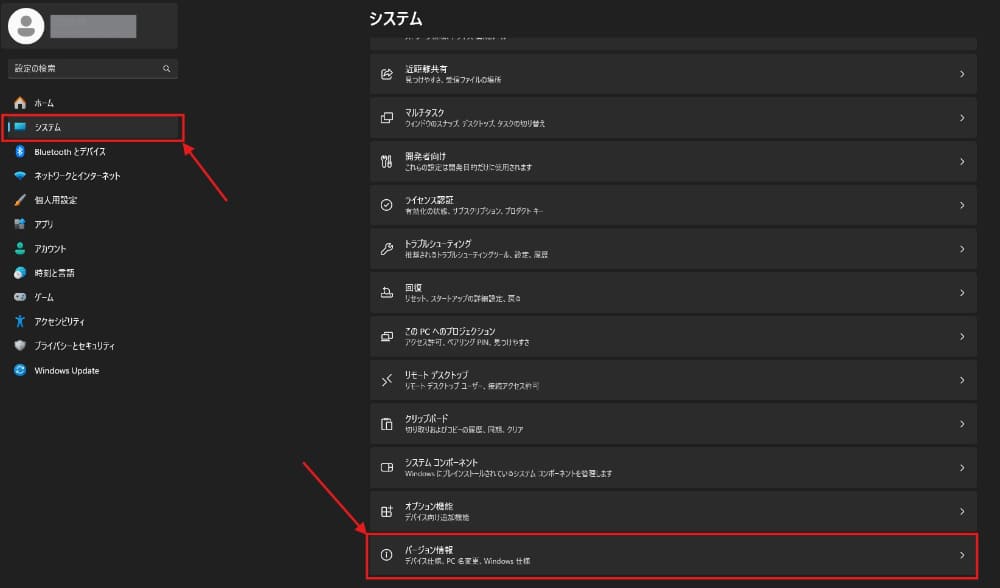
The CPU model number and memory capacity can be checked from the Windows settings screen. The steps are as follows:
- Right-click the “Start” button and open “Settings.”
- Select “System” from the left menu.
- Click “About” at the bottom of the page.
- In the “Device Specifications” section, check “Processor” (CPU model number) and “Installed RAM” (memory capacity).
To briefly explain how to read the CPU model number, for instance, “Core i7-14700F” means that “i7” represents the grade (performance rank) and “14” indicates the generation. The higher the numerical value for grades, the better the performance, and the newer the generation, the more efficient the processing.
Steps to Check GPU and VRAM Capacity from Task Manager
The GPU name and VRAM (video memory) capacity can be checked from the task manager.
- Press “Ctrl + Shift + Esc” simultaneously to open the task manager.
- Click the “Performance” tab from the top or left menu.
- Click “GPU” from the left list, and the GPU name (e.g., NVIDIA GeForce RTX 4060) and “Dedicated GPU Memory” (VRAM capacity) will be displayed on the right.
By comparing the confirmed GPU name with the previously mentioned spec table, you can ascertain which streaming styles your PC can handle.
If the GPU usage is consistently above 90%, there is a high likelihood of experiencing spec shortages during streaming, so consider replacement or expansion.
Options if the Checked Specs Do Not Meet the Standards
If your specs do not meet the standards upon checking, your options are “part upgrades” or “new purchases.”
For memory shortages or storage deficiencies, upgrading parts can be a cost-effective solution. Memory upgrades (e.g., 16GB to 32GB) typically cost around 5,000 to 10,000 JPY and only require inserting into the designated slots, making it relatively easy for PC beginners. Adding an SSD is similarly cost-effective.
On the other hand, if the CPU or GPU is two generations or more outdated, it is typically more reasonable to purchase a new one rather than exchange individual parts. For laptops, CPU or GPU replacements are usually not possible, so consider purchasing a new one if specs are insufficient.
For those wanting a comprehensive view of the initial costs, including PCs, check the following article.
>>Vtuber Startup Costs: Breakdown by Genre and Tips to Stay Under ¥10,000!
VTuber Computer Specs Composition and Selection Based on Price Range
VTuber PC configurations you can choose from vary significantly across three levels based on budget. In 2026, the prices for PC parts are overall on the rise, so keep in mind that you might need to increase your budget compared to before.
Here, we will explain three segments: entry (100,000 – 150,000 JPY), mid-range (150,000 – 250,000 JPY), and high-spec (250,000 JPY or more).
100,000 – 150,000 JPY | Entry Configuration Suitable for Chatting & Singing Streams
The 100,000 – 150,000 JPY range is for those looking to start VTuber streaming with a computer as cheaply as possible. However, due to the overall rising prices of PC parts in 2026, options available at this price range are limited. An example of specs is as follows:
| Parts | Example Configuration |
|---|---|
| CPU | Ryzen 5 5600/Ryzen 5 4500 |
| GPU | RTX 5050 |
| Memory | 16GB |
| Storage | SSD 500GB – 1TB |
Even with computers in this price range, it is possible to conduct chatting and singing streams while running a Live2D model. When running tracking software such as VTube Studio alongside OBS Studio, the processing capabilities of RTX 5050 are sufficient for just displaying a Live2D avatar.
150,000 – 250,000 JPY | Mid-Range Configuration for Comfortable Game Streaming
The 150,000 – 250,000 JPY range is ideal for VTubers who also want to play games. This price range is well-balanced and offers high cost-performance opportunities for many VTubers. An example configuration is as follows:
| Parts | Example Configuration |
|---|---|
| CPU | Core i7-14700F/Ryzen 7 9700X |
| GPU | RTX 5060 Ti/RTX 5060 |
| Memory | 32GB |
| Storage | SSD 1TB |
This PC’s specs allow for streaming while comfortably playing most games at full HD resolution, displaying VTuber avatars simultaneously. With RTX 5060 Ti, you will be able to play many titles at high quality settings even at WQHD (2,560 x 1,440) resolution, making it easier to create visually appealing streams.
250,000 JPY or More | High-Spec Configuration Capable of 3D Streaming and High-Quality Gaming
If you have a budget of 250,000 JPY or more, you can choose a high-spec PC that allows for VTuber 3D streaming or 4K gaming.
Real-time rendering of 3D models places substantial loads on the computer, so if you aim to engage seriously in 3D streaming, this price range is the realistic starting point.
| Parts | Example Configuration |
|---|---|
| CPU | Ryzen 7 9800X3D/Core Ultra 9 285K |
| GPU | RTX 5070 Ti/RTX 5080 |
| Memory | 32GB |
| Storage | SSD 1TB to 2TB |
With a GPU of RTX 5070 Ti or higher, you can render 3D models in high quality while also accommodating 4K streaming for games and high frame rate streaming in WQHD.
While SSDs of 1TB to 2TB are recommended for storage, materials for 4K and game recording can consume large capacities, so it can be reassuring to select a configuration allowing for additional SSD or HDD expansion as needed.
Top 5 Recommended VTuber PCs for 2026
Here are five carefully selected recommended gaming PCs that you can choose from based on your streaming style and budget. I have selected one from each category: entry-level, mid-range, high-spec, cost-effective, and laptop. All are current models available for purchase at BTO shops in 2026.
For Entry-Level | A Device Sufficient for Chatting & Singing Streams
The entry-level recommendation is Dospara’s “THIRDWAVE AD-R7X56A-01B.”
| Item | Specs |
|---|---|
| CPU | Ryzen 7 5700X |
| GPU | RTX 5060 8GB |
| Memory | 16GB |
| Storage | SSD 500GB (NVMe) |
| Price | 159,980 JPY (tax included) |
Equipped with RTX 5060, this model supports Full HD streaming, and the 8-core, 16-thread Ryzen 7 5700X allows stable processing even while running streaming software simultaneously.
This model is suitable for those wanting to start VTuber activities on a low budget, but you may experience lag during streaming of the most demanding games. The standard configuration consists of 16GB memory and a 500GB SSD, so it is recommended to upgrade to 32GB of memory and change the SSD to 1TB at the time of purchase.
For Mid-Range | A Device that Can Comfortably Handle Game Streaming
The recommended mid-range device is “NEXTGEAR JG-A7G6T” from Mouse Computer.
| Item | Specs |
|---|---|
| CPU | Ryzen 7 5700X |
| GPU | RTX 5060 Ti 16GB |
| Memory | 16GB |
| Storage | SSD 1TB (NVMe) |
| Price | 229,900 JPY (tax included) |
This device can stream FPS games at Full HD and around 144fps and comes with a water-cooled CPU cooler to handle heat during streaming. It has sufficient resources to run both streaming software and games simultaneously, allowing a comfortable play and stream experience for most titles. As the standard memory is 16GB, an upgrade to 32GB is recommended at the time of purchase.
For High-Spec | A Device that Can Handle 3D Streaming with Ease
The recommended high-spec device is “GALLERIA XDR7A-R57T-GD” from Dospara.
| Item | Specs |
|---|---|
| CPU | Ryzen 7 9800X3D |
| GPU | RTX 5070 Ti 16GB |
| Memory | 32GB |
| Storage | SSD 1TB (NVMe) |
| Price | 509,980 JPY (tax included) |
This model features high performance comparable to those used by corporate-affiliated VTubers. It allows for streaming the latest games in WQHD or high frame rate.
3D streaming and VRChat also operate smoothly, providing reassurance that you won’t face performance shortages in the long run. Customizing storage to 2TB will ensure ample space for recording data and game capacity.
For Cost-Effectiveness | A Device that Balances Budget and Performance
If you prioritize cost-effectiveness, consider “FRGHLB550/9060” from FRONTIER.
| Item | Specs |
|---|---|
| CPU | Ryzen 7 5700X |
| GPU | Radeon RX 9060 XT 16GB |
| Memory | 32GB |
| Storage | SSD 1TB |
| Price | 244,800 JPY (tax included) |
This device comes pre-installed with 32GB of memory and a 1TB SSD, meaning there are no additional customization costs, which is why its cost-performance ratio is high. It is more than sufficient for chatting and singing streams, and can handle moderately demanding game streaming as well.
However, please note that FRONTIER products are made to order, so it takes approximately two weeks from order to delivery.
For Laptops | A Device Suitable for Those Wanting Portability
For VTubers wanting to set up a streaming environment with a laptop, “G-TUNE H6-A9G70BK-C” from Mouse Computer is recommended.
| Item | Specs |
|---|---|
| CPU | Ryzen 9 8945HX |
| GPU | RTX 5070 Laptop GPU (GDDR7 8GB) |
| Memory | 32GB |
| Storage | SSD 1TB |
| Display | 16 inches / 300Hz / WQXGA |
| Weight | About 2.30kg |
| Price | 369,800 JPY (tax included) |
This laptop has performance comparable to the desktop version of the RTX 4070, providing specs that enable high-quality, high-FPS gameplay suitable for VTuber activities. At around 2.30kg, it’s portable and can cater to collaboration streams or event participation away from home.
However, laptops usually lack the expandability and heat dissipation capabilities of desktops. Although I recommend a desktop PC for a main streaming environment, there are numerous situations where a laptop can excel as a secondary device or for outdoor use.
*Prices are based on the official site information of each manufacturer as of March 2026. They may fluctuate due to sales and other factors.
How to Choose a VTuber Computer with an Eye on Future 3D Capabilities and Specs Upgrades
By selecting a PC configuration that offers expandability from the start, you can adapt to changes in your streaming style by simply swapping out parts, allowing for long-term usage. Here, we will discuss points to consider when choosing a PC with expandability in mind and how to prepare for future 3D capabilities.
Choose a Desktop PC that is Easy to Expand
The greatest advantage of a desktop PC is its high expandability. Even if you begin to feel specs falling short as you continue streaming, details can be upgraded on a part-by-part basis.
To ensure expandability, keep the following three points in mind:
- Available memory slots (allowing future upgrade from 32GB to 64GB)
- Configuration with sufficient power supply unit capacity (750W or more to accommodate future high-performance GPU installations)
- Motherboard with multiple M.2 SSD slots (supporting storage expansion)
Choosing an ATX-size case will offer ample internal space, thereby improving the ease of upgrades. BTO shops often allow for customization that takes future expansions into account, so be sure to check the power capacity and available slots at the time of order.
Gradually Gather Additional Equipment Needed for 3D Streaming
In 3D streaming, in addition to your main PC, costs for additional equipment such as VR headsets and VIVE trackers will also arise. Since real-time rendering and encoding need to be conducted simultaneously, a high-end PC configuration is essential, making it challenging to acquire everything all at once.
It’s common for VTubers to begin with Live2D (2D streaming) and consider transitioning to 3D only after achieving an increase in viewers. If you gather equipment gradually, you can spread initial costs, moving forward at a manageable pace.
If OBS becomes sluggish during 3D streaming, optimizing settings may resolve the issue. Please also refer to the following article.
>> Fix OBS Lag and Stutter: Causes and Solutions Explained Clearly
Conclusion
This article explained the PC specs required for VTubers, from recommended configurations based on streaming styles to part selection and recommended PC models.
VTuber activities typically require higher specs than standard gaming needs, so if you are considering game streaming, aim for a budget of over 200,000 JPY. If your focus is solely on chatting and singing streams, it might be possible to start at around 150,000 JPY, but options may be limited due to rising PC parts prices in 2026.
First, decide on your streaming style and select a PC that fits your budget – that will be your first step toward success. If you already own a PC, refer to the section on checking specs to compare against the standards.
If you want to know more about the necessary specs for the streaming software OBS, check the article linked below as well.
>> OBS Requirements Guide: From Recommended PCs to Running Without a GPU!