


Share


How to Play BGM and Music on IRIAM Streams: No-Equipment Methods and Where to Find Tracks

“I don’t know how to play BGM on IRIAM,” “I want to play music without any extra gear,” “I’m not sure about the copyright rules.” If any of these sound familiar, you’re not alone.
You can play BGM and music on IRIAM streams without any equipment, but using a mixer or PC lets you build a higher-quality, easier-to-listen-to environment.
This article covers how to play BGM and music on IRIAM, copyright rules to follow, where to find safe audio sources, and what to do if BGM isn’t playing.
By the end, you’ll be set up to put together a BGM environment that fits your IRIAM stream — even as a beginner, your stream will sound cleaner and the vibe will land better.

How to Play BGM and Music on IRIAM
How you play BGM and music on IRIAM depends on what equipment you’re using. This section walks through the methods for each setup.
- No equipment: pick up audio from a separate PC or smartphone
- Route audio through a mixer
Let’s look at which approach fits you best.
No Equipment: Pick Up Audio From a Separate PC or Smartphone
The easiest no-equipment method on IRIAM is playing music on a separate PC or smartphone and letting your streaming phone’s mic pick up the sound directly. IRIAM doesn’t support playing music apps in the background on the same device while streaming.
If you have another smartphone or laptop on hand, you can start streaming with BGM without buying any extra gear. Just place the music-playing device near your streaming phone, and the mic will pick up the BGM. There’s no complex setup involved, which makes it a great starting point for anyone trying IRIAM streaming for the first time.
Cranking the speaker volume too high makes your voice harder to hear, so dial the BGM down a little — that usually sounds the most natural.
Route Audio Through a Mixer
If you care about audio quality on IRIAM, routing through a mixer is the way to go. A mixer lets you adjust mic and BGM volume separately, so your voice doesn’t get buried — and the stream sounds clearer.
When you play BGM from the phone alone, room noise and reverb get picked up too, which makes things harder to listen to. With a mixer in the chain, you send a cleaner mix to the stream — less noise, more stable audio.
Especially for singing streams or long sessions, balancing BGM against your voice matters a lot. If audio quality is a priority, the mixer route is the right choice.
How to Play High-Quality BGM and Music on IRIAM
To get a higher-quality BGM and music sound on IRIAM, using equipment to fine-tune your audio is key. This section covers how.
- Use a mixer
- Use a PC as your BGM device
- Connect your phone, PC, and gear properly
Let’s look at how to reduce distortion and noise and bring your stream closer to clear, easy-to-listen audio.
If you also want details on IRIAM streaming equipment, check this related article.
>>IRIAM Streaming Equipment Guide: Must-Have Gear and Budget-Based Setup Recommendations
Use a Mixer
For high-quality BGM on IRIAM, a mixer like the YAMAHA AG03 series is the standard recommendation. The AG03 series is widely used for streaming, and connection guides and setup examples are easy to find online.
Even for first-time mixer users, the volume controls are intuitive and easy to operate. Since mic audio and BGM can be adjusted separately, your voice won’t get drowned out, and the stream will be easier to listen to.
On IRIAM streams in particular, noise and distortion can make audio hard to hear, so stable audio management with an AG03 makes a real difference.
Use a PC as Your BGM Device
If you want stable, high-quality BGM, using a PC as a dedicated BGM device is a smart move. Connect the PC to your mixer, and you can play BGM separately from your streaming smartphone — much easier to manage.
The advantage of using a PC is that song selection and volume adjustment are fast. You can keep video sites or music streaming services open as you work, so changing BGM during the stream is easy, and matching music to the moment becomes natural.
For just-chatting streams or long sessions, PC-based BGM management cuts down on operational load while keeping audio quality solid. If you want a setup that prioritizes stability, this is one of the easiest to adopt.
Connect Your Phone, PC, and Gear Properly
To build a stable audio environment on IRIAM, connecting your phone, PC, and gear correctly matters a lot. Specifically when using a mixer with an iPhone, an Apple official adapter is the way to avoid connection issues.
Cheap conversion adapters tend to cause problems like no audio input, intermittent disconnections, or noise. Audio trouble during a stream makes things hard for viewers, which can hurt your stream’s image or drive listeners away.
With mixer-based setups especially, connection stability directly affects audio quality, so going with an Apple official adapter is the safer choice. Running a connection test before going live helps prevent issues from popping up mid-stream.
Copyright Rules to Follow When Playing BGM and Music on IRIAM
When using music on IRIAM streams, understanding the copyright rules first is essential. This section covers the rules to keep in mind.
- Don’t use commercial CDs or subscription music sources without permission
- JASRAC- and NexTone-managed songs may require an application or report
To avoid stream takedowns or other trouble, get familiar with which sources are usable and what paperwork is needed.
On IRIAM streams, you can’t play commercial CDs or subscription music sources like Spotify without permission.
Even if you’ve bought the CD, personal listening and broadcasting on a stream are treated differently — which could put you in copyright violation territory. IRIAM’s official FAQ also warns against using third-party copyrighted works without permission.
IRIAM Official FAQ: “Using Others’ Copyrighted Works”
Most music subscription services have terms designed around personal use and don’t permit streaming use. Using them as BGM without permission can lead to stream takedowns or account restrictions.
To stream safely, pick royalty-free sources that explicitly allow streaming use, or music libraries with clear usage terms. Reading the terms of service in advance is the best way to avoid copyright trouble.
JASRAC- and NexTone-Managed Songs May Require Reporting
When using music on IRIAM streams, even JASRAC- or NexTone-managed songs require filing the necessary reports. Note that for songs managed by JASRAC or NexTone, playing commercial CD masters, subscription sources, or karaoke tracks as-is may require separate master recording rights clearance. For karaoke streams, acoustic streams, and a cappella streams, singing without checking the conditions can violate the rules — so it pays to confirm first.
On IRIAM, you can report used songs from My Page inside the app. The flow is: enter the song title and artist name, and submit per song used. If you’re singing, check the “Streaming” field on JASRAC or NexTone’s search service ahead of time.
According to IRIAM’s official FAQ, reports can be filed either before or after the stream. For detailed terms, check the official page.
IRIAM Official FAQ: “Music Usage During Streaming (Singing, Performance, BGM)”
Safe Ways to Find BGM and Music for IRIAM
To use BGM and music safely on IRIAM, look for sources while checking usage terms. This section covers safe ways to find audio.
- Look on dedicated royalty-free music sites
- Search the JASRAC/NexTone database
Here’s how to find sources you can use with confidence, while steering clear of copyright trouble.
Look on Dedicated Royalty-Free Music Sites
For safe BGM on IRIAM streams, looking on royalty-free music sites that explicitly allow streaming use is the safer route. Sites with clean, organized usage terms let you pick music without worrying about copyright issues.
Royalty-free music sites often spell out conditions like “OK for streaming” or “OK for commercial use,” which is easy for beginners to verify. When searching by search engine, combinations like “royalty-free music streaming OK” or “BGM copyright free” help you find good results.
Watch out: even free downloads may require credit, and some sources prohibit streaming use. Always check the terms before downloading.
Search the JASRAC/NexTone Database
If you have a specific existing song you want to use, checking whether it’s usable for streaming via the JASRAC/NexTone search databases first is important. Even well-known songs may be out of scope depending on usage conditions.
The process for checking on JASRAC or NexTone:
- Open JASRAC or NexTone’s song search page
- Enter the song title or artist name and search
- From the results, check the song’s details
- Check the “Streaming” field
Karaoke tracks and original recordings involve master recording rights separately from copyright. Just because a song shows up in the search doesn’t mean you can use it unconditionally — confirm the usage scope.
Recommended Royalty-Free Sites for IRIAM BGM and Music
When looking for BGM and music for IRIAM streams, royalty-free music sites are the way to go. Here are some recommended sites.
- DOVA-SYNDROME
- BGMer
- Amacha’s Music Workshop
- Noiseless World
- PeriTune
Try to find music that fits the mood and genre of your stream.
DOVA-SYNDROME

| Name | DOVA-SYNDROME |
| URL | https://dova-s.jp/ |
| Features | ・Search by composer ・Filter by play length and mood ・Browse the newest BGM by latest order |
| Commercial use | Generally allowed |
| Credit required | Generally not required |
DOVA-SYNDROME is a go-to royalty-free music site that’s widely used by IRIAM streamers too. The catalog covers everything from calm tracks for chatting streams to upbeat BGM for energetic content.
With about 19,000 royalty-free BGM tracks and 1,300 SE clips available, you’ll have an easy time finding music that fits your stream’s vibe. Always check each track’s usage terms before using it.
BGMer

| Name | BGMer |
| URL | https://bgmer.net/ |
| Features | ・Specialized for streamers ・Plenty of genres for videos and just-chatting ・Many loop-friendly tracks |
| Commercial use | Generally allowed |
| Credit required | Generally optional |
BGMer is a royalty-free music site built for streamers and video creators. The library leans toward BGM that fits just-chatting and work-along streams, and it’s known to pair well with IRIAM streams.
It supports commercial use, no credit required, which makes it easy for beginners to use. If you’re looking for music that’s easy to drop into a stream, this is a solid choice.
Amacha’s Music Workshop
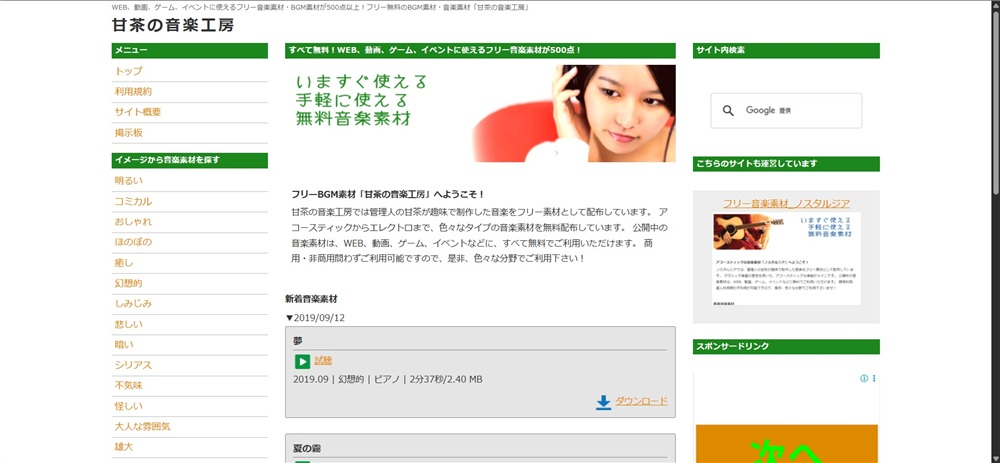
| Name | Amacha’s Music Workshop |
| URL | https://amachamusic.chagasi.com/ |
| Features | ・Rich acoustic BGM library ・Lots of daily-life and healing tracks ・Easy to search by image/mood |
| Commercial use | Generally allowed |
| Credit required | Generally optional |
Amacha’s Music Workshop is a royalty-free music site that’s easy to use when you want calm-feeling BGM. There’s a lot of gentle music that pairs well with just-chatting and work-along streams.
You can search by image — “fun,” “bittersweet,” and so on — which makes it intuitive to find BGM that fits your stream content. Check the site’s terms before use.
Noiseless World

| Name | Noiseless World |
| URL | https://noiselessworld.net/ |
| Features | ・Lots of band-driven tracks ・Stylish, memorable melodies ・Plenty of emotional BGM |
| Commercial use | Generally allowed |
| Credit required | Generally optional |
Noiseless World is a royalty-free music site with plenty of BGM that leans into live-instrument feel. Unlike the typical work-along BGM, the melodies tend to stick — useful for setting a mood.
It’s especially good at creating a stylish atmosphere for just-chatting streams or late-night streams. If you want BGM that leaves an impression on listeners, this site is a strong fit.
PeriTune

| Name | PeriTune |
| URL | https://peritune.com/ |
| Features | ・Rich fantasy BGM library・Lots of work-along and ambient music・Music that helps set a world |
| Commercial use | Generally allowed |
| Credit required | Generally optional |
PeriTune is a royalty-free music site that’s great when you want BGM with a fantastical feel. The catalog leans RPG-style and folk-music-inspired, which pairs well with IRIAM streams that emphasize original characters and worldbuilding.
There’s plenty of calm work-along music too, so it works for just-chatting and read-aloud streams. If you want a unified feel across your entire stream, this site is easy to use.
Benefits of Playing BGM and Music on IRIAM Streams
Playing BGM and music on IRIAM streams makes the overall listening experience easier and more inviting. This section covers the benefits.
- You can shape the mood of the stream
- You avoid silent stretches and prevent listener drop-off
BGM changes the impression of a stream — let’s look at the concrete benefits.
You Can Shape the Mood of the Stream
When you play BGM on IRIAM streams, it’s easier to convey the mood and world of your stream to listeners. Compared to a voice-only stream, it sticks in memory more, and it makes it easier to set the atmosphere for just-chatting or themed streams.
For example, a calm just-chatting stream pairs well with quiet BGM, while an energetic themed stream pairs with upbeat music. Matching music to your stream theme makes the direction land naturally. When stream content and music direction match, listeners get drawn into the atmosphere more easily.
On IRIAM in particular, the combination of voice and BGM shapes how a stream feels — making music part of your worldbuilding is effective.
You Avoid Silent Stretches and Prevent Listener Drop-Off
When you play BGM on IRIAM streams, silence is less of an issue and listener drop-off is easier to prevent. Even when conversation lulls, BGM keeps things from feeling dead, and helps maintain the stream’s overall mood.
For just-chatting streams especially, silence can creep in while you wait for comments or shift topics. Having BGM eases those awkward gaps and creates an environment where listeners are more comfortable sticking around.
Calm music in the background also picks up listeners who keep streams on like work-along audio. If you want to boost session duration, BGM is an effective lever.
Why BGM and Music Aren’t Playing on IRIAM — Causes and Fixes
If BGM and music aren’t playing on IRIAM, check your connections and device permissions. This section covers the typical causes and fixes.
- PC or mixer connection issues
- Loopback function is off
- Smartphone mic access permission isn’t granted
- Conversion adapter or cable compatibility issue
These are common causes for beginners — let’s walk through them.
PC or Mixer Connection Issues
If BGM isn’t playing on IRIAM, check PC or mixer connection issues first. A cable that’s only partially plugged in or a wrong port can prevent audio from coming through.
With mixer-based streams in particular, check that input selection buttons and audio input settings are set correctly. If the input is switched to a different source, music playing on your PC won’t reach the stream.
Often, “reseat the cable” or “try a different port” fixes the issue. Running an audio test before going live helps prevent on-stream problems.
Loopback Function Is Off
A common reason BGM isn’t playing on IRIAM is that the mixer’s loopback function is off. Loopback is the setting that routes audio playing on your PC into your streaming smartphone.
On the YAMAHA AG03 series in particular, if loopback is disabled, only the mic audio reaches the stream and BGM doesn’t come through. Check the loopback switch on the mixer or in the dedicated settings page.
If the change doesn’t take effect, restarting the mixer or streaming app sometimes resolves it. When using a mixer, run a test stream before going live to be safe.
Smartphone Mic Access Permission Isn’t Granted
Another reason BGM and music may not play is that your smartphone’s mic access permission is off. Without mic permission, the IRIAM app can’t recognize audio input from external gear or a mixer.
You can check this in your phone’s “Settings.” Open IRIAM from the app list and confirm that “Microphone” is on. After a device switch or first launch, permission may not be automatically granted.
After changing permissions, restart the app to apply the changes. After any settings change, test with a quick stream to confirm audio.
Conversion Adapter or Cable Compatibility Issue
If BGM and music aren’t reaching IRIAM streams, the conversion adapter or cable may have a compatibility issue. Even if the connector looks the same, products that don’t support audio input won’t be recognized by the phone.
Non-official conversion adapters in particular may support only charging or only some functions. For iPhone-based streaming, using an Apple official adapter is the way to prevent audio issues.
Mismatched cable standards can also cause only BGM to drop out. If you suspect a connection issue, try swapping cables while testing.
Summary
On IRIAM, you can put together an environment that fits your needs — from no-equipment BGM playback to high-quality audio with mixers and PCs. Using BGM helps shape the stream’s mood and prevents listener drop-off.
On the other hand, using music without understanding the copyright rules can lead to stream takedowns or terms violations. To keep streaming safely, check usage conditions first.
Use this article as a reference to put together a BGM environment that fits you, and aim for IRIAM streams that are easy to listen to and feel right.