


Share


IRIAM Banaibe (Top Banner Challenge) Explained: When You Can Join, Requirements, and How to Prepare

“What exactly is IRIAM’s banaibe? When can I join, and what do I need to qualify?” If you have just debuted as a V-Liver, these are probably the questions on your mind.
You only get one shot at it per account, so the last thing you want is to let your assigned week slip by without noticing.
This article explains what IRIAM’s banaibe (officially called the IRIAM Top Banner Challenge) actually is, when you can take part, what the requirements are, and how the rankings are calculated.
From advance preparation to the steps on the day and the pitfalls to avoid, everything here is written for beginners. Use it to pin down your own event week and make that one-time week count.

What Is IRIAM’s Banaibe?
Banaibe is the nickname IRIAM streamers use for the “IRIAM Top Banner Challenge,” a ranking-style event for newly debuted livers. Your participation window is set roughly one month after your very first stream, and each account can only take part once.
Your placement is decided by the event points you earn during the event period — a figure calculated from the gifts, comments and stars you receive.
Because you compete only against livers who debuted around the same time, it is often described as a rite of passage for newcomers. The name comes from the fact that top finishers have traditionally been featured on the app’s top banner.
That said, the rewards and rules are specific to each round of the event, so always check the event page inside the app for the details that apply to you.
When You Can Join IRIAM’s Banaibe

You can only enter the one specific round assigned to you, which falls roughly a month after your first stream. As a rule, the Top Banner Challenge runs from Tuesday 19:00 to the following Monday 23:59, and takes place three to four times a month.
Your round is determined by the date and time of your first stream, and eligible livers receive a notice in the app’s “Notices for You” section about a week before it starts.
Here is a quick reference table of the event rules.
| Item | Details |
|---|---|
| Event period | Tuesday 19:00 to the following Monday 23:59 |
| Frequency | 3–4 times a month (adjusted by the day the month starts) |
| Your window | The round roughly one month after your first stream |
| Notification | “Notices for You” in the app, about a week before |
Note that no event is held in the final week of a month with five Tuesdays, and rounds may be pushed back a week when a special event is running. You can also check the upcoming schedule on the calendar in IRIAM’s official event portal.
Source: IRIAM, “About the eligibility period for the IRIAM Top Banner Challenge” (Japanese)
If you have not started on IRIAM yet, this article walks you through everything up to your first stream.
>>How to Start Streaming on IRIAM: A 6-Step Beginner’s Guide to V-Liver Live Streaming
Requirements for Joining IRIAM’s Banaibe

To take part, your first stream has to fall inside the eligibility period, and you also need to meet the conditions listed in the event details in the app. If you join without meeting them, you may forfeit your right to the rewards, so check them in advance.
What counts is not how long you streamed, but the date and time you first went live. The official FAQ states that even a stream you started by mistake is recorded as your first stream.
Test streams are the thing to watch. If you run a test stream on an earlier day than your real debut, that earlier date becomes the reference point and your banaibe week arrives sooner than you expected. When you want to check that everything works, do your test stream and your actual first stream on the same day.
How Rankings Are Decided in IRIAM’s Banaibe
Your rank is based on the total event points you earn during the event period. Event points are an aggregate figure calculated from the gifts, comments and stars your listeners send, and they are the metric used to rank ranking-style events.
The exact formula and the update interval are not published, and the official FAQ explicitly says IRIAM cannot answer questions about the details.
Only what you earn after you enter the event, and within the event period, is counted. No matter how lively your streams were before you tapped “Join,” none of it shows up in your points. You can see your current position on the event ranking page, or from the event icon displayed on your streaming screen.
Just like event points, your day-to-day rank is built from the same accumulated support. This article explains how that system works.
>>How to Raise Your IRIAM Rank: The Daily Rank Score System Explained
Benefits of Taking Part in IRIAM’s Banaibe

Banaibe is not only about competing for a rank. It is a chance to lift your whole newcomer period a level: more exposure, shared goals with your listeners, new stream formats to try, and a moment to think about where you want to take your activity next.
Here are four benefits of joining IRIAM’s banaibe.
New Listeners Can Find You More Easily
While the event is running, participating livers and their point totals are shown on the ranking page, giving you a touchpoint outside your usual streams. Listeners who came to cheer on a friend who debuted at the same time may spot you there too.
That said, simply entering does not guarantee new listeners. Pair your stream content with announcements on X and keep working at being discovered.
Setting a concrete goal — a specific rank, or finishing in the prize places — makes it much easier to tell your listeners what you are aiming for during the week.
The official “IRIAM event portal” lets you look up past event results, and the point totals of previous winners — including first place — give you a rough sense of where the cutoff sits. Use IRIAM’s published data when you set targets and plan tactics with your listeners.
It Pushes You to Try New Stream Formats
Banaibe is a good excuse to attempt something beyond your usual just-chatting stream. Plenty of livers have placed by building their week around quizzes, comedy segments, singing or drawing.
Do not pick an idea just because it sounds flashy, though. Prioritize formats that match what your listeners respond to and what you are actually good at.
If singing is the format you want to try, get the setup and the song rules straight first.
>>How to Do a Singing Stream on IRIAM: Setup Steps, Song Reporting, and Backing Track Rules
You Can Rethink Where Your Activity Is Heading
How your listeners react during the event, and the result at the end of it, both give you material for reviewing your plans. Which topics landed, which time slots people found easy to join, what style of interaction brought more comments — one week produces a surprising amount of insight.
You do not need to judge yourself by your rank alone. Treat it as an opportunity to work out a streaming style you can keep up long after banaibe is over.
How to Prepare Before IRIAM’s Banaibe
If you want to finish the week without regrets, preparation before it starts is essential. Below are five things to get in order in advance: your goal, your schedule, your content, your announcements and your streaming setup.
Decide What You Are Aiming For
Start by deciding what matters most to you — “enjoy taking part,” “finish in the prize places,” “meet new listeners” — because that choice changes how you design your streaming hours and what content you plan.
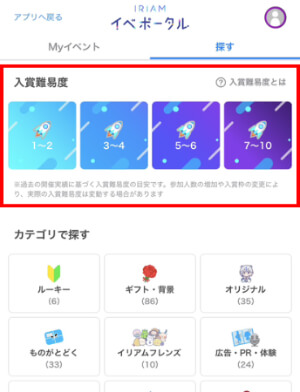
If you are going for a placing, the 10-level difficulty rating shown on the IRIAM event portal is a useful reference. It is an estimate based on past results, so weigh it against your current streaming situation and pick a level you can realistically sustain.
Build a One-Week Streaming Schedule
Check the event period — Tuesday evening through the following Monday — then block out your daily life first and build the schedule around it. Put work, school and sleep into your calendar, and place your streaming slots in the time that is left. That order makes it far easier to build a plan you can actually keep.
You do not have to assume long streams every single day. Decide in advance which time slots are easiest to attend and which days you will push hardest, and share your schedule with your listeners.
Lock In Your Stream Content
Finalize what you will run during the event before it begins, and prepare the assets and a running order to go with it. If you improvise on the day, you will be busy handling comments and the segment ends up half-finished.
The test for any idea is whether both you and your existing listeners will enjoy it. In an interview with a prize-winning liver, one point that came up was developing a segment out of something that already got a good reaction in day-to-day streams. Reinforcing a segment you know works beats hunting for a wild new idea from scratch.
Announce the Dates on X
For your announcement on X, put the event name, the period, your streaming schedule and your goal into a single image or a single post.
X lets you pin a post to the top of your profile, so pinning your announcement means visitors see it first.
Keep it pinned for the whole event, and if anything changes, add an update or re-announce as early as you can.
Check Your Streaming Setup
Before day one, confirm that your device meets IRIAM’s system requirements (supported OS versions, memory and so on). The conditions are published in the official FAQ, with minimum and recommended specs listed separately for iOS and Android.
It also helps to practise restarting the app and your device, and switching between Wi-Fi and mobile data, so you can handle any trouble on the day.
If you are unsure about microphones and other gear, this article is a good starting point.
>>IRIAM Streaming Equipment Guide: Must-Have Gear and Budget-Based Setup Recommendations
How to Enter IRIAM’s Banaibe

Entering is done entirely inside the app. Here are the four steps, from checking your notification to tapping the join button and following your points, so you are not fumbling around on the day.
Step 1: Open the In-App Notification
Eligible livers receive a “Notices for You” message roughly a week before their round. Open it first and confirm which round you are in and when it runs.
Receiving the notice does not enter you into the event. Once you have read it, make sure you go through to the event details screen.
Step 2: Check the Event Details
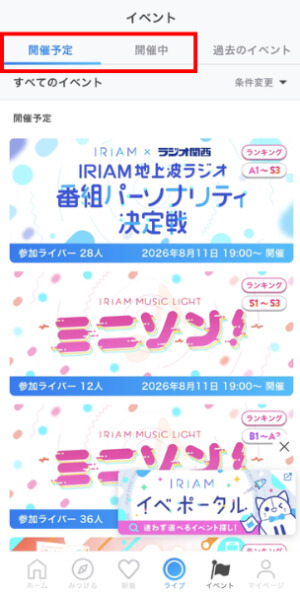
You can reach the event details by tapping the “Upcoming” or “Ongoing” banner in the app’s Events list. Read through the overview, the period, the entry conditions, the rewards and the rules.
Because IRIAM’s banaibe has its own specifications for each round, do not rely on the conditions from a previous round. It is also worth knowing that IRIAM has a culture of livers sending thank-you gifts to listeners after placing in an event.
Step 3: Tap “Join”
Entering is as simple as tapping “Join” at the bottom right of the event details screen. Your points only start being counted once you have done this.
Even after the event has begun, any gifts, comments and stars earned before you tapped “Join” will not count toward your event points. Always confirm that you have entered before you start streaming on day one.
Step 4: Watch the Ranking Screen
After entering, you can check your points and rank on the event ranking page or from the event icon on your streaming screen. The number under the icon also shows your current point total.
Comments and stars are reflected in batches at set intervals. If the numbers have not moved right after a stream, give it a little time before assuming something has gone missing.
Things to Watch Out For During IRIAM’s Banaibe
Banaibe runs hot, and that is exactly why running it the wrong way takes a toll on your health and on your relationship with your listeners. Here is what to know in advance about stream length, how you handle gifts, and sleep.
Do Not Assume You Need Marathon Streams
Rankings are decided by event points, not by how many hours you were live. The official FAQ states that event points are made up of gifts, comments and stars — streaming time is not one of the components.
Even so, there will be moments when you worry that taking a break will cost you a place and you feel like extending the stream. Do not make longer hours the goal in itself. Work backwards from your physical condition and what your content actually needs, and set hours you can sustain.
Never Pressure Listeners for Gifts
Telling your listeners your goal or your current rank is perfectly fine, but avoid framing support in a way that narrows their options. Specifying an amount to spend, or making people feel guilty for not supporting you, is out of bounds.
IRIAM’s official FAQ publishes examples of prohibited behaviour and points of caution, and depending on what you say, a warning or other action may follow.
Gifts are not the only way to support you during banaibe. Comments and stars also count toward your points, so say out loud that everyone can join in at whatever level works for them. If you plan thank-you gifts for listeners, take care not to word them in a way that encourages heavy spending.
Do Not Cut Into Your Sleep
Keep your bedtime and wake-up time close to your normal rhythm during the event, and protect your sleeping hours.
An information site run by Japan’s Ministry of Health, Labour and Welfare explains that chronic sleep deprivation brings on drowsiness, reduced motivation and weaker memory. With your judgement dulled, it becomes much harder to keep the quality of your streams and the flow of your content up.
Avoid piling on late-night or early-morning slots, and on days when you feel unwell, be willing to take the day off. To make it through the full week, schedule your sleep before the event even starts.
How to Balance IRIAM’s Banaibe With a Full-Time Job
If you have a day job, the workable approach is to put work, commuting, meals, bathing and sleep into your schedule first, and decide your streaming slots from what is left. Fitting streaming into your life, rather than rebuilding your life around streaming, is what gets you through the week without burning out.
Fixing your start and end times on weekdays, and pushing any adjustments to the weekend and the final day, keeps the impact on work down. There is even a published interview with a liver working a regular job who planned their shifts in advance and finished 7th in banaibe.
Source: illuminary, IRIAM’s official interview media, “Shinjo Byakuya” (Japanese)
Of course, your week may land right in your busiest period at work. Setting “finish the week while keeping the job going” as your goal, rather than a rank, is a perfectly respectable way to fight. This article covers more tips on keeping streaming sustainable.
>>Who’s Suited to Be a V-Liver? Key Traits, a Simple Checklist, and Tips to Keep Going
Widening Your Streaming Range Beyond IRIAM With “Alive Studio”

Once banaibe is behind you and you want to expand into PC streaming on YouTube or Twitch, “Alive Studio” is worth a look. It is a stream screen design service for streamers and VTubers from GMO Pepabo, and it works together with the streaming software OBS Studio.
Just by picking assets, you can set up stream backgrounds, BGM, sound effects, topic roulettes and on-screen text on your OBS layout.
There are two plans: a free plan with over 400 assets, and a paid Premium plan with unlimited use of more than 1,700. Note that because Alive Studio works with OBS, it is not a way to decorate the streaming screen inside the IRIAM app. Commercial use is supported, so the chatting and content skills you built on IRIAM carry straight over to PC streaming.
If that sounds useful, take a look at the official page below.
Summary
This article covered IRIAM’s banaibe — the IRIAM Top Banner Challenge — from when you can join and what the requirements are, through how the rankings work, how to prepare, the steps on the day, and the pitfalls to avoid.
There are three points to take away:
- Banaibe generally runs from Tuesday 19:00 to the following Monday 23:59, and you can enter once, in the round assigned roughly a month after your first stream
- Rankings are decided by event points calculated from gifts, comments and stars, and nothing you stream before tapping “Join” is counted
- Five pieces of preparation — your goal, your schedule, your content, your announcements and your setup — support both your result and your health on the day
Precisely because you cannot choose your own week, what you do before the notification arrives decides the outcome. Start by checking the date of your first stream in the app, and begin preparing for your one and only week.